
How Ansys HPC Servers Accelerate Your Fluent Dynamic Simulations
We have all been there. You hit “Calculate” on a transient simulation, and the estimated time remaining pops up: 340 hours. Your heart sinks. You do the math—that is two weeks of waiting, assuming the power doesn’t go out and Windows Update doesn’t decide to reboot your machine.
In the fast-paced world of engineering R&D, waiting weeks for a result is no longer acceptable. The physics we are tackling today—Unsteady RANS (URANS), Large Eddy Simulation (LES), and complex dynamic mesh performance studies—require computational power that far exceeds a standard engineering workstation.
This is where High-Performance Computing (HPC) steps in.
As an HPC Architect who has spent the last 15 years optimizing cluster configuration for Ansys, I can tell you that throwing money at a faster processor isn’t always the answer. True acceleration comes from understanding ansys hpc architecture, mastering the licensing models, and optimizing how Fluent talks to the hardware. In this guide, we will look under the hood of parallel processing and show you how to turn those “weeks” into “hours.”
Why Is Parallel Processing Essential for Modern CFD?
Ten years ago, a 2-million cell steady-state simulation was considered “large.” Today, in our CFD consulting services, we routinely handle cases exceeding 100 million cells. Why the explosion in size? Because engineers are no longer satisfied with simple approximations. We want to capture the tip vortices on a wind turbine, the combustion instability in a turbine, or the precise valve motion in a heart pump.
This level of high-fidelity turbulence modeling requires a massive number of calculations per second.
If you run these simulations on a single core (serial processing), the CPU has to calculate the equations for Cell 1, then Cell 2, then Cell 3, all the way to Cell 100,000,000. It is a single-lane road with a traffic jam stretching for miles.
Parallel processing changes the game by adding lanes to the highway. By splitting the mesh into smaller chunks and assigning each chunk to a different processor core, we can calculate millions of cells simultaneously. This isn’t just a luxury; for optimizing Fluent for multicore efficiency in transient simulations, it is a mathematical necessity. Without it, the time-to-solution pushes past the boundaries of product development cycles.
What Is “Ansys HPC” and How Does the Licensing Work?
Technically, “Ansys HPC” refers to the specific licensing add-ons that allow the solver to utilize more than the standard number of cores. This is often the most confusing part for IT managers and engineers alike.
Out of the box, a standard Ansys Fluent license (Ansys CFX or Mechanical as well) typically allows you to run on 4 cores. This is great for learning, but useless for serious industrial work. To go faster, you need to purchase additional “HPC capacity.”
There are two primary ways Ansys licenses this, and choosing the wrong one can cost you thousands. You can check our detailed breakdown on ansys hpc licensing options here.
1. Ansys HPC Workgroup (Per-Core)
This is a linear model. You buy licenses for the exact number of cores you need. If you want to run on 16 cores, you buy 16 HPC licenses.
- Best for: Small teams with consistent, low-core-count workloads.
2. Ansys HPC Packs (Parametric/Exponential)
This is the choice for power users. It rewards you for scaling up. Instead of buying cores one by one, you buy “Packs,” and the core count grows exponentially.
How Do HPC Packs Scale Your Simulation Capacity?
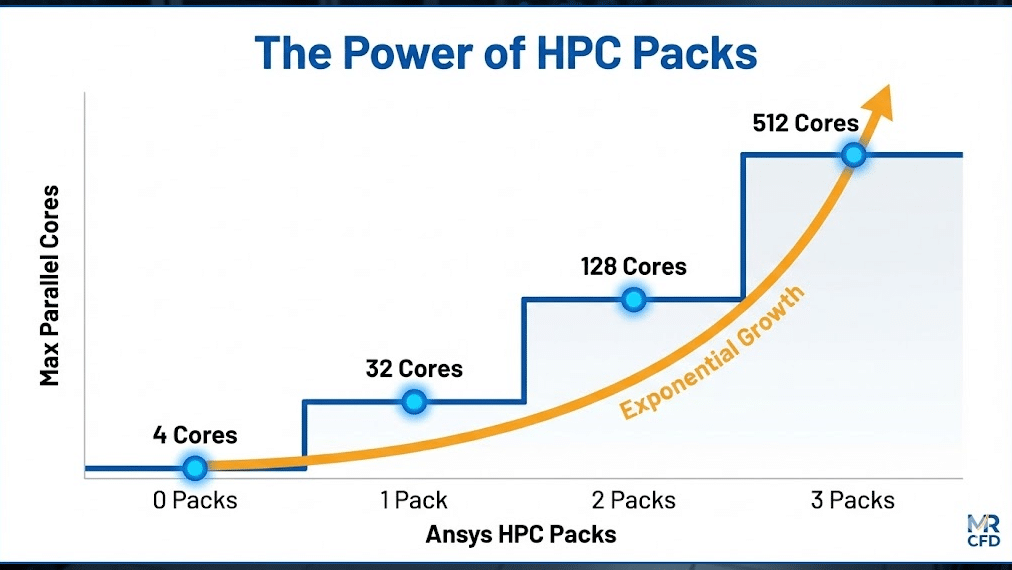
The HPC Pack vs HPC Workgroup debate almost always ends with Packs when you are looking for high scalability. The math behind HPC Packs is designed to encourage massive parallelization.
Here is how the capacity stacks up:
- 0 Packs: 4 Cores (Base License)
- 1 Pack: Up to 32 Cores (approx.)
- 2 Packs: Up to 128 Cores
- 3 Packs: Up to 512 Cores
- 4 Packs: Up to 2,048 Cores
- 5 Packs: Up to 32,768 Cores
Note: The exact base core counts can vary slightly depending on the specific Ansys release version, but the exponential tiering remains consistent.
This exponential growth means that purchasing just one additional pack (going from 1 to 2) quadruples your available compute power. For managers, this offers a compelling ROI: the cost per core drops dramatically as you scale up. If you are planning a cluster configuration for Ansys, targeting the “sweet spot” of 2 or 3 HPC Packs usually provides the best balance of cost and performance.
How Does Ansys Fluent Distribute the Workload (MPI)?
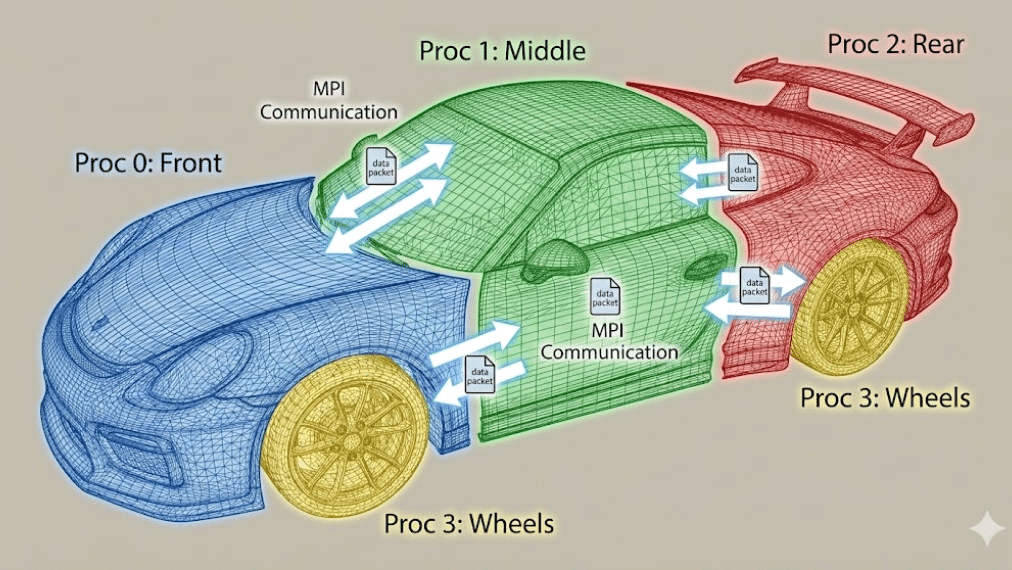
You have the licenses, and you have the cores. But how does Fluent actually use them? It uses a standard known as MPI for CFD (Message Passing Interface).
When you click “Run,” Fluent doesn’t just send the whole problem to every core. It performs a process called Domain Decomposition.
Imagine you are simulating the airflow over a car. Fluent cuts the air volume around the car into separate regions (partitions).
- Core 1 calculates the air in front of the bumper.
- Core 2 calculates the air over the hood.
- Core 3 calculates the wake behind the trunk.
The Challenge: The air moving from the bumper (Core 1) flows into the hood section (Core 2). These cores need to talk to each other to pass pressure and velocity data across the boundaries. This is where domain decomposition efficiency becomes critical.
If the “talk time” (communication) takes longer than the “work time” (calculation), your simulation efficiency drops. This is why we use specific partitioning methods (like Metis) to ensure every core gets a compact chunk of cells with minimal surface area, reducing the chatter between processors.
What Hardware Requirements Maximize Ansys HPC Performance?
A common mistake I see in DIY builds is focusing solely on CPU clock speed (GHz). In Ansys Fluent parallel processing, memory bandwidth is king.
Here is the hierarchy of hardware importance for Ansys HPC:
- Memory Bandwidth: When 64 cores are all asking for data at the same time, a standard consumer motherboard chokes. You need server-class hardware (like AMD EPYC or Intel Xeon Scalable) with 8 or 12 memory channels per socket.
- Interconnect Latency: If you are connecting multiple computers (nodes) together, you cannot use standard Ethernet cables. You need Infiniband (HDR or NDR). Low interconnect latency ensures that Core 1 on Server A can talk to Core 65 on Server B instantly. High latency kills parallel performance.
- Core Count: More is generally better, but only if you have the bandwidth to feed them.
- Clock Speed: Higher GHz helps, but it is less critical than bandwidth for large CFD cases.
If you are seeing parallel efficiency (Amdahl’s Law) drop off rapidly as you add cores, it is almost always a hardware bottleneck in the memory or interconnect, not a software issue.
How Do MR CFD’s Managed HPC Services Remove the Complexity?
Configuring a cluster, setting up a Linux OS, configuring the MPI libraries, and managing a license server is a full-time IT job. For most engineering firms, this is a distraction from their core business: designing products.
MR CFD managed HPC services strips away this complexity.
We provide a “Simulation-Ready” environment.
- No Hardware to Buy: You access our enterprise-grade clusters tailored for CFD.
- Pre-Licensed: You don’t need to worry about buying HPC Packs; we handle the licensing infrastructure.
- Optimized Settings: We configure the Ansys RSM (Remote Solve Manager) and MPI settings for you, ensuring you get maximum scalability benchmark validation out of the box.
You simply upload your .cas file, select your core count (e.g., 128 or 256 cores), and hit run. It transforms Supercomputing from a capital project into a utility service.
Case Study: How Much Faster Can Your Dynamic Mesh Simulation Run?
To illustrate the impact, let’s look at a recent project involving dynamic mesh performance.
The Scenario: A client was simulating a positive displacement pump. The mesh had to deform and remesh at every time step to account for the rotating gears.
- Mesh Size: 12 Million Cells.
- Physics: Transient, Multiphase (VOF), Dynamic Mesh.
- Hardware: Local Workstation (16 Cores).
The Problem: The dynamic mesh update process is computationally expensive. On their local machine, the simulation was progressing at 10 minutes per time step. With 5,000 time steps required, the total time was 35 days.
The Ansys HPC Solution: We moved the case to the MR CFD Cluster using 2 HPC Packs (128 Cores).
- Parallel Speedup: The solver scaled nearly linearly.
- Dynamic Mesh Optimization: We distributed the remeshing workload across the cores.
The Result: The time per time step dropped to 45 seconds. The total simulation finished in roughly 60 hours (2.5 days) instead of 35 days. This allowed the client to run three different design iterations in the time it would have taken to run just 20% of the original case. This is the power of reducing total solve time.
Frequently Asked Questions
What is the difference between Ansys HPC and Ansys Enterprise Cloud?
Ansys HPC refers to the licensing technology that enables parallel processing on any hardware (your local machine or a cluster). Ansys Enterprise Cloud is a platform/service that provides the infrastructure (AWS/Azure) to run those licenses. At MR CFD, we offer a similar managed infrastructure service that often proves more cost-effective and personalized for specific CFD workflows.
Do I need a GPU to run Ansys HPC?
For years, CFD was purely CPU-based. However, the new Ansys Fluent native GPU solver is changing this. If you have the specific enterprise licenses that support GPU acceleration, a single high-end GPU (like an NVIDIA A100) can match the performance of hundreds of CPU cores. However, traditional features (like certain dynamic mesh types or complex User Defined Functions) may still require standard CPU-based Ansys HPC.
Why does my simulation slow down if I use too many cores?
This is known as “scaling saturation.” Every time you split the mesh, you create more boundaries. If the number of cells per core drops too low (e.g., below 50,000 cells per core), the cores spend more time talking to each other (MPI communication) than calculating. You need to ensure your mesh is large enough to justify the hardware.
Can I use Ansys HPC licenses on a local workstation?
Yes. Ansys HPC licenses are hardware-agnostic. If you have a powerful dual-socket workstation with 64 cores under your desk, you can use HPC Packs to unlock all those cores. You are not forced to use a cloud cluster; the license simply unlocks the parallel capability wherever you choose to compute.
How does MR CFD charge for HPC services?
We offer flexible models to suit different needs. You can pay via a “Pay-As-You-Go” model for sporadic projects, charging per core-hour. For intensive R&D, we offer subscription or project-based pricing that includes Ansys Fluent course materials and technical support to ensure you are getting the most out of the hardware.
Related Posts
Errors Occurring in Simulations with ANSYS Fluent: A Technical Guide to Convergence & Stability
ANSYS Fluent simulates engineering problems based on the Finite Volume Method (FVM). Consequently, the errors…

Ansys HPC Case Study: Accelerating a 120-Million Cell Simulation Using MR CFD’s Ansys HPC Service
In the high-stakes world of aerodynamics, fidelity is everything. But as engineers, we often hit…

HPC Cloud Services: Pay-as-You-Go Supercomputing Guide
In the traditional engineering landscape, your ability to innovate was strictly limited by the hardware…
 Talk On WhatsApp
 Talk On WeChat

Comments (0)