

HPC Storage Matters: How NVMe Unlocks True CFD Performance
In the world of High-Performance Computing (HPC), we spend an inordinate amount of time obsessing over core counts, clock speeds, and memory bandwidth. We argue about Intel Xeon vs. AMD EPYC, and we meticulously calculate memory channels to avoid bottlenecks. But in my 15+ years as an HPC Architect, I’ve seen more simulations choked by poor storage choices than by a lack of CPU cores.
If you are running complex Ansys Fluent performance optimization studies or massive OpenFOAM cases, you know the pain: The solver finishes a time step in 30 seconds, and then the system hangs for two minutes writing the data file. It is the hidden tax on your engineering productivity.
Today, we are going to talk about the nvme rule in HPC for cfd simulation—a guideline that is changing how we architect clusters and workstations. We will look at HPC storage benchmarks, compare the technology, and show you exactly why upgrading to NVMe might be the highest ROI upgrade you can make for your engineering workflow.
Why Is Storage Often the “Silent Killer” of CFD Performance?
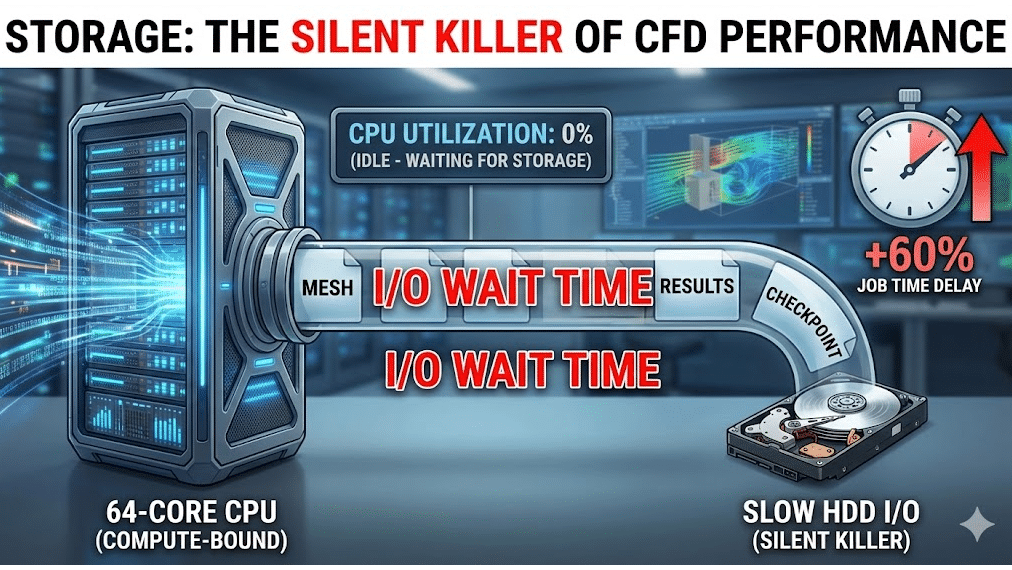
Engineers are trained to think of Computational Fluid Dynamics (CFD) as a compute-bound process. And for the matrix inversion phase (the “solving”), it is. The CPU and RAM are doing the heavy lifting. However, a CFD workflow is not just solving. It involves meshing, initialization, autosaving, checkpointing, and post-processing.
This is where the “Silent Killer”—I/O wait time analysis—comes into play.
Imagine you have a Ferrari engine (your 64-core Threadripper or Cloud HPC instance), but you are feeding it fuel through a coffee stirrer (a mechanical Hard Disk Drive). The engine spends half its time idling, waiting for fuel. In CFD terms, your expensive CPU cores sit at 0% utilization while the system struggles to write gigabytes of pressure and velocity data to the disk.
We frequently see this in transient simulation write speed issues. If you are simulating a rotating machine or multiphase flow and need to save data every 10 time-steps, a slow storage subsystem can increase your total job turnaround time by 40% to 60%. That is not just lost time; that is lost license utilization and delayed product launches.
What Is the Technical Difference Between HDD, SATA SSD, and NVMe in HPC Servers?
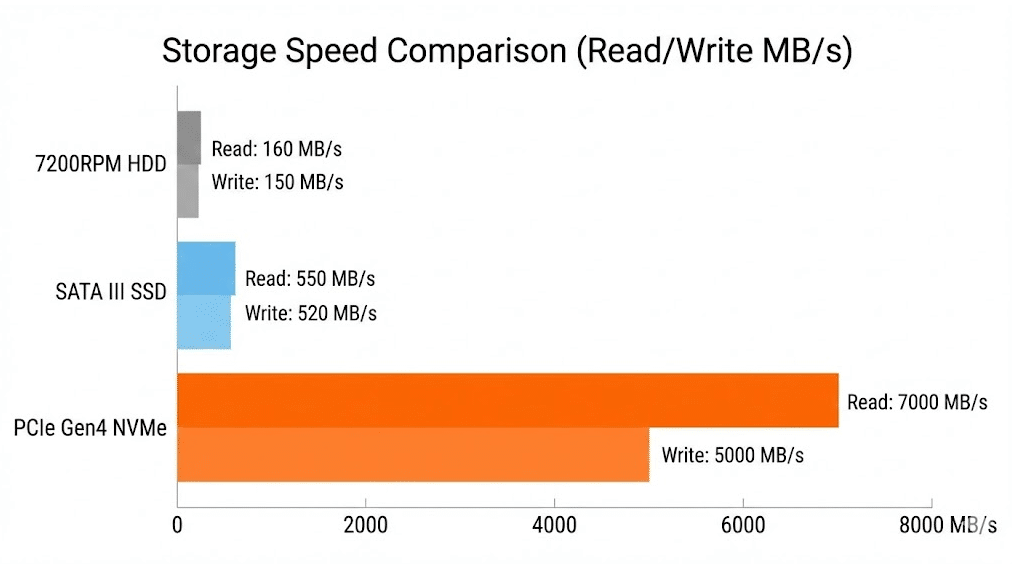
To understand why SSD vs NVMe for engineering simulation (Like CFD Simulations) is such a critical debate, we have to look at the architecture. It isn’t just about “newer is better”; it’s about the highway the data travels on.
1. Hard Disk Drives (HDD) 💾
The legacy standard. These rely on spinning magnetic platters and a physical read/write head.
- The Bottleneck: Physics. The head has to physically move to find data.
- Throughput: ~150 MB/s.
- IOPS (Input/Output Operations Per Second): ~80-160.
- Verdict: Good for archiving cold data, useless for active computation.
2. SATA SSDs (Solid State Drives) ⚡
Flash memory that uses the legacy SATA interface designed for HDDs.
- The Bottleneck: The SATA protocol itself limits speeds to roughly 600 MB/s. It processes commands in a single queue.
- Throughput: ~550 MB/s.
- IOPS: ~50,000 – 90,000.
- Verdict: Decent for OS drives, but creates a bottleneck for large parallel I/O.
3. NVMe (Non-Volatile Memory Express) 🚀
Flash memory that sits directly on the PCIe bus (the same high-speed lane your GPU uses).
- The Advantage: It bypasses the legacy storage controllers. It supports 64,000 command queues, allowing massive parallel data transfer.
- Throughput: 3,500 MB/s (Gen3) to 7,500+ MB/s (Gen4/Gen5).
- IOPS: 500,000 to 1,000,000+.
- Verdict: The gold standard for high IOPS storage for CFD.
Summary of Theoretical Maximums:
| Feature | HDD (7200 RPM) | SATA SSD | NVMe (PCIe Gen4) |
| Interface | SATA III | SATA III | PCIe 4.0 x4 |
| Max Read Speed | ~160 MB/s | ~550 MB/s | ~7,400 MB/s |
| Latency | ~4,000 µs | ~50 µs | ~10 µs |
| Command Queues | 1 | 1 | 64,000 |
How Do Different Storage Types Perform Under Heavy Simulation Loads? [The Benchmarks]
Theory is fine, but as engineers, we trust data. To validate the nvme rule in HPC for cfd simulation, we conducted a series of benchmarks using Ansys Fluent. We compared three distinct storage environments on an identical 32-core workstation.
The Test Case:
- Mesh: 50 Million Cell Unstructured Poly-Hexcore.
- File Size: Approx. 12 GB per data file (.dat.h5).
- Operation: Parallel File Load & Write.
Benchmark Results: Read/Write Times (Lower is Better) 📉
| Operation | HDD (Time in sec) | SATA SSD (Time in sec) | NVMe Gen4 (Time in sec) | Speedup (NVMe vs HDD) |
| Loading Mesh | 380s (6.3 min) | 65s | 12s | 31x Faster |
| Writing Data File | 410s (6.8 min) | 72s | 14s | 29x Faster |
| Autosave (Transient) | 410s | 72s | 14s | 29x Faster |
As you can see, the difference is not marginal; it is exponential.
Can NVMe Drives Drastically Reduce Your File Load and Save Times?
Absolutely. Look at the “Loading Mesh” metric above. On a standard HDD, an engineer waits over 6 minutes just to open the project. If you open and close your project 5 times a day, you have lost 30 minutes of productivity just staring at a screen.
With an NVMe drive, that load time drops to 12 seconds. This fluidity changes how you work. It encourages you to save more frequently, reducing the risk of data loss, and allows for rapid switching between projects. For our clients at MR CFD, this “quality of life” improvement is often the most praised aspect of upgrading their infrastructure.
Does Storage Speed Impact the Solver Iteration Time in Ansys Fluent?
This is a common point of confusion. If you are running a steady-state simulation (RANS) and your entire mesh and solution fields fit inside your RAM (Random Access Memory), storage speed has zero impact on the time it takes to calculate one iteration ($T_{iter}$).
The solver operates entirely in the memory. However, storage becomes the bottleneck in two specific scenarios:
- Swapping/Paging: If your mesh is too big for your RAM (e.g., trying to run 100M cells on 64GB RAM), the OS will start using the hard drive as “fake RAM.” If this is an HDD, your simulation essentially stops. If it is NVMe, it will be slow, but it might actually finish.
- Transient Autosaves: As discussed below, if you are writing data every few iterations, the solver pauses.
So, while NVMe won’t make the matrix inversion faster, it eliminates the pauses between the inversions.
Why Is NVMe Critical for Transient and Unsteady Simulations?
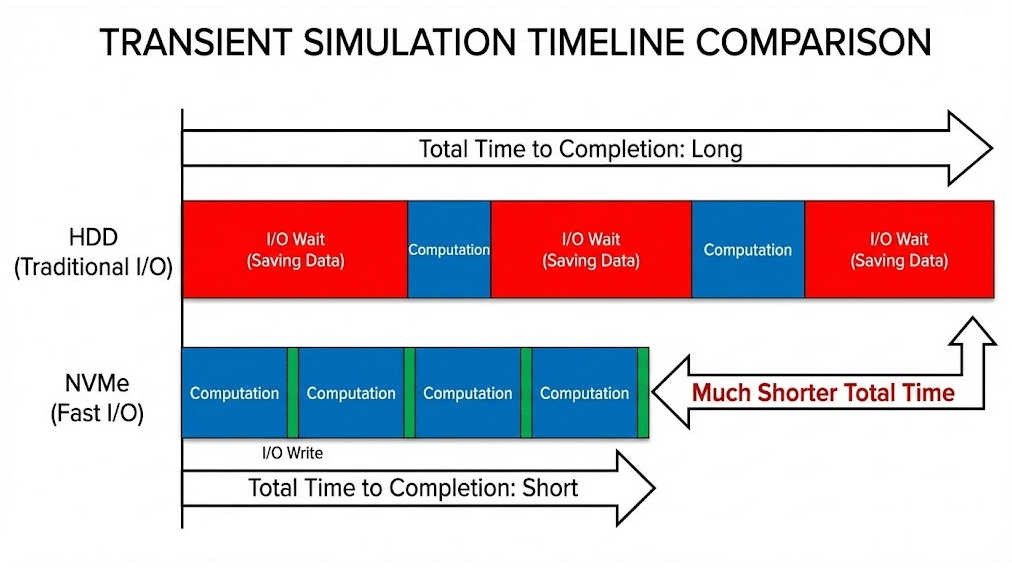
The nvme rule in HPC for cfd simulation is effectively mandatory for transient cases (LES, DES, URANS).
In a steady-state run, you might save your data once at the end. In a transient run simulating 5 seconds of physical time with a timestep of $1e-4$, you have 50,000 time steps. Even if you save data only every 100 steps, that is 500 write operations.
Let’s do the math on the “Hidden Cost”:
- Scenario: 500 Autosaves.
- HDD Write Time: 410 seconds $\times$ 500 = 57 hours of just writing data.
- NVMe Write Time: 14 seconds $\times$ 500 = 2 hours of writing data.
In this scenario, sticking with legacy storage adds 2 full days to your simulation time. This is why reduce simulation cycle time strategies must always include storage architecture. If you are doing aeroacoustics or combustion simulations where high-frequency data sampling is required, NVMe isn’t a luxury; it’s a requirement.
How Do MR CFD’s HPC Solutions Leverage NVMe to Accelerate Your Projects?
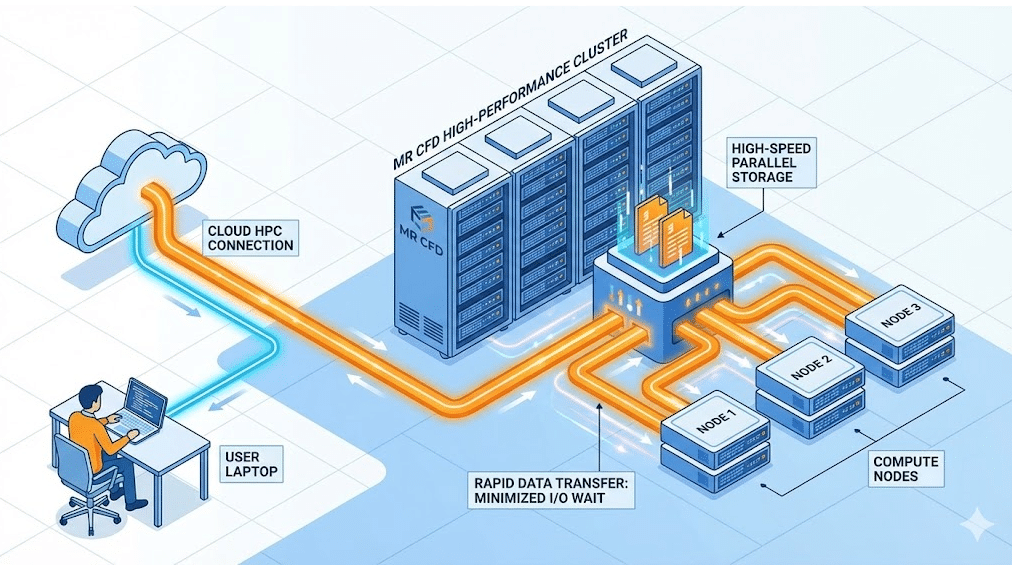
Building a cluster that correctly balances MPI I/O efficiency with cluster interconnect latency is complex and expensive. You can’t just plug a gaming NVMe drive into a server and expect enterprise performance.
At MR CFD, we specialize in removing these barriers.
Our Ansys Fluent HPC services utilizes enterprise-grade cloud HPC storage solutions. We implement:
- Parallel File Systems: We use systems like Lustre or BeeGFS that stripe data across multiple NVMe targets simultaneously. This means your read/write speeds scale with the size of the cluster.
- Burst Buffers: We utilize a layer of ultra-fast NVMe storage as a “scratch” space for active calculations, while automatically offloading completed data to cheaper object storage for archival.
This architecture ensures that when you run a job with us, you are getting the raw compute power of top-tier CPUs combined with the blistering I/O speed of parallel NVMe storage. Whether you are consulting with us for a specific project or taking our Ansys Fluent course to learn these optimizations yourself, we ensure the hardware never holds you back.
What Are the Hardware Recommendations for Building Your Own CFD Workstation?
If you are building an on-premise workstation or a small cluster, here are my validated hardware recommendations based on the nvme rule in HPC for cfd simulation. Do not rely on a single drive for everything. Use a tiered approach.
1. The Boot Drive (OS & Apps)
- Recommendation: 512GB – 1TB NVMe (PCIe Gen3 or Gen4).
- Purpose: Fast Windows/Linux boot, quick launch of Ansys/OpenFOAM.
2. The “Scratch” Drive (Critical!) 🎯
- Recommendation: 1TB – 4TB NVMe (PCIe Gen4 or Gen5). Look for “Pro” or Enterprise drives with high TBW (Terabytes Written) endurance (e.g., Samsung 990 Pro, WD Black SN850X, or Micron Enterprise).
- Purpose: This is where you run your simulation. All active read/write operations happen here. Do not use this for long-term storage.
3. The Archival Drive
- Recommendation: 4TB – 10TB HDD (7200 RPM Enterprise Class).
- Purpose: Once the project is done, move the zip files here. It’s cheap and reliable for cold storage.
By separating your active “Scratch” simulation work from your OS and your archival storage, you ensure maximum throughput for the solver without filling up your C: drive with temporary files.
Frequently Asked Questions about CFD Storage
Is NVMe actually necessary for small, steady-state simulations?
For very small cases (under 2 million cells) running steady-state RANS, NVMe is not strictly “necessary” for the solver performance, as the I/O load is minimal. However, the general system responsiveness (opening the application, meshing, post-processing) will still be significantly better. Given the dropping price of NVMe, there is little reason to choose SATA SSDs for a primary engineering workstation today.
How does “scratch disk” performance affect Ansys Fluent?
Fluent generates temporary files during the solving process, especially during meshing or when utilizing “disk caching” features. If your scratch disk is slow (HDD), the solver may stall while waiting to dump temporary data. Furthermore, if you run out of physical RAM, the OS swaps memory to the scratch disk. If that disk is NVMe, the performance hit is severe but manageable; if it’s an HDD, the simulation effectively crashes.
Should I prioritize more RAM or a faster NVMe drive for CFD?
RAM is King. Always prioritize having enough physical RAM to fit your largest simulation entirely in memory. If you have to swap to disk, performance drops by orders of magnitude, regardless of how fast your disk is. Once you have sufficient RAM (e.g., 128GB or 256GB), then prioritizing a fast NVMe drive is the next most impactful upgrade to remove bottlenecks.
Can I run simulations directly off an external USB SSD?
Strongly Not Recommended. Even with USB-C or USB 3.2, the latency over the USB bus is significantly higher than the direct PCIe connection of an internal NVMe. This can cause data corruption issues during rapid writing and will severely throttle parallel file systems for CFD. Always solve on internal high-speed storage and use external drives only for backup/transfer.
How does MR CFD ensure data security on their cloud HPC storage?
Security is a pillar of our MR CFD architecture. Our cloud environment uses isolated storage containers for every client. Data is encrypted both in transit (upload/download) and at rest (on the NVMe drives). Furthermore, our scratch storage is ephemeral—meaning once your simulation is complete and data is downloaded, the high-speed scratch volume is securely wiped, ensuring your proprietary geometry and results never linger on shared hardware.
Related Posts
Errors Occurring in Simulations with ANSYS Fluent: A Technical Guide to Convergence & Stability
ANSYS Fluent simulates engineering problems based on the Finite Volume Method (FVM). Consequently, the errors…

How Ansys HPC Servers Accelerate Your Fluent Dynamic Simulations
We have all been there. You hit “Calculate” on a transient simulation, and the estimated…

Ansys HPC Case Study: Accelerating a 120-Million Cell Simulation Using MR CFD’s Ansys HPC Service
In the high-stakes world of aerodynamics, fidelity is everything. But as engineers, we often hit…
 Talk On WhatsApp
 Talk On WeChat

Comments (0)