
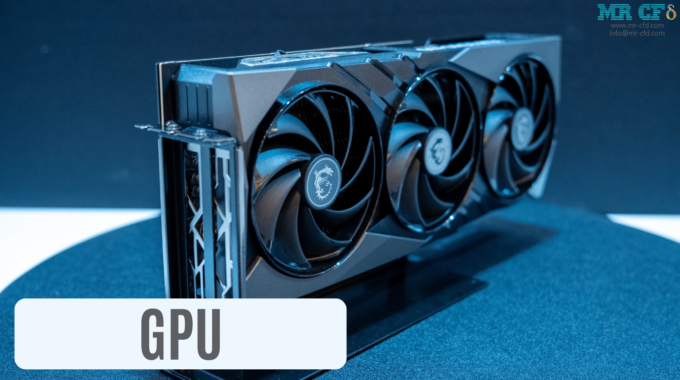
GPUs in High-Performance Computing (HPC): Accelerating ANSYS Fluent CFD
Exploring GPUs in CFD Simulations with ANSYS Fluent
The quest for faster, more accurate, and larger-scale Computational Fluid Dynamics (CFD) simulations is a driving force in engineering and scientific research. High-Performance Computing (HPC) provides the raw power needed, and within the HPC ecosystem, Graphics Processing Units (GPUs) have emerged as a transformative technology. This is particularly true for demanding software like ANSYS Fluent, where GPUs can unlock unprecedented simulation speeds and capabilities. As of 2025, leveraging GPUs within an HPC strategy is no longer a niche consideration but a mainstream pathway to tackling complex fluid dynamics challenges that were once computationally prohibitive. This post from MR CFD, delves into how GPUs are reshaping the landscape of HPC for ANSYS Fluent CFD, offering insights into their role, benefits, selection, and strategic implementation.
The Impact of GPUs on HPC for CFD Simulations with ANSYS Fluent
The integration of GPUs into High-Performance Computing clusters has marked a significant inflection point for CFD simulations. Historically, the intricate calculations demanded by ANSYS Fluent relied predominantly on Central Processing Units (CPUs). However, the inherently parallel nature of many CFD algorithms aligns perfectly with GPU architecture, which is designed for massive parallel computation. This synergy translates into substantial performance gains, allowing engineers and researchers to:
- Solve larger and more complex models: Tackle simulations with tens or even hundreds of millions of cells.
- Reduce turnaround times: Obtain critical design insights faster, accelerating development cycles.
- Enable more sophisticated physics: Explore phenomena like detailed turbulence, multiphase flows, and reacting flows with greater fidelity.
- Improve cost-efficiency: In certain scenarios, GPU-accelerated HPC systems can offer better performance per dollar and lower energy consumption compared to CPU-only clusters of equivalent power.
This exploration will guide you through understanding how GPUs contribute to these HPC advancements specifically within the context of ANSYS Fluent, helping you make informed decisions for your computational needs.
The GPU’s Role in Modern HPC for Computational Fluid Dynamics (CFD)
At their core, GPUs are specialized electronic circuits designed to rapidly manipulate and alter memory to accelerate the creation of images in a frame buffer intended for output to a display device. However, their highly parallel structure makes them more effective than general-purpose CPUs for algorithms where processing of large blocks of data is done in parallel. In the realm of CFD, this means GPUs can simultaneously perform calculations for vast numbers of discrete points or cells within a simulation domain.
ANSYS Fluent’s GPU solver is engineered to offload these computationally intensive portions of the simulation to the GPU(s) within an HPC system. The Video RAM (VRAM) on the GPU is a critical component, as it stores the active simulation data (mesh, variables, etc.) for rapid access by the GPU cores.
Key Benefits of GPUs in an HPC CFD Workflow:
- Massive Parallelism: Thousands of smaller cores designed for simultaneous calculations, ideal for the matrix operations and iterative solvers common in CFD.
- High Memory Bandwidth: GPUs typically feature very high memory bandwidth, allowing quick data transfer between VRAM and processing cores, crucial for data-intensive CFD tasks.
- Specialized Solvers: Certain solver technologies within ANSYS Fluent are specifically optimized or inherently well-suited for GPU execution.
- Energy Efficiency: For highly parallelizable workloads, GPUs can often deliver more computations per watt than CPUs, a significant factor in large HPC installations.
A common rule of thumb for VRAM requirement in ANSYS Fluent is approximately 1-3 GB of VRAM per million grid elements. This can increase significantly with the complexity of the physics involved (e.g., turbulence models, multiphase flows, combustion). In an HPC context, ensuring sufficient VRAM is paramount to handling the massive datasets generated by cutting-edge simulations.
When Are GPUs Essential for ANSYS Fluent in an HPC Environment?
While GPUs offer compelling advantages, their benefits are most pronounced in specific scenarios within an HPC setup for ANSYS Fluent:
- Large-Scale Simulations:
- Models with tens to hundreds of millions of elements (or even more in leading-edge research) benefit immensely. External automotive aerodynamics, aerospace applications, and large industrial processes often fall into this category. The ability of GPUs to process these vast datasets in parallel significantly cuts down solution time on an HPC cluster.
- Specific Solver Types in ANSYS Fluent:
- Particle-based solvers: Methods like the Lattice Boltzmann Method (LBM), Discrete Element Method (DEM), and Smoothed Particle Hydrodynamics (SPH) exhibit high degrees of parallelism inherently suitable for GPU architectures.
- Raytracing solvers: For applications like the SBR+ solver in electromagnetics or advanced radiation modeling in CFD, the ray tracing process is highly parallelizable and sees substantial speedups on GPUs.
- Certain portions of the pressure-based coupled solver and density-based solver in Fluent are also GPU-accelerated.
- Multi-GPU Setups within HPC Nodes:
- For extremely large simulations that exceed the VRAM or processing capacity of a single GPU, HPC nodes equipped with multiple GPUs (e.g., 2, 4, or 8 GPUs) connected via high-speed interconnects like NVIDIA NVLink become essential. This allows for domain decomposition across GPUs or pooling of resources for larger problem sizes.
However, it’s important to note that not all aspects of a CFD workflow or all physics models within ANSYS Fluent are fully GPU-accelerated. Some pre-processing, post-processing, or specific physics modules might still rely heavily on CPU performance. Amdahl’s Law reminds us that the serial portion of any code will ultimately limit overall speedup. Therefore, a balanced HPC system often utilizes both powerful CPUs and potent GPUs.
Table: GPU vs. CPU-Dominant HPC Scenarios in ANSYS Fluent
| Scenario / Workload | Likely More Beneficial on GPU-Accelerated HPC | Likely More CPU-Dominant (or less GPU benefit) |
| Very large meshes (>50M cells) with supported solvers | ✓ | Small to moderate meshes (<10M cells) |
| Lattice Boltzmann Method (LBM) simulations | ✓ | Heavily serial pre/post-processing tasks |
| Discrete Element Method (DEM) | ✓ | Some legacy or highly custom UDFs |
| Simulations requiring extreme parallel throughput | ✓ | Simulations with unsupported physics on GPU |
| Multi-GPU scaling for massive problems | ✓ | I/O bound simulations |
Always consult the latest ANSYS Fluent documentation for specific feature support on GPUs.
GPU vs. CPU Performance for CFD Simulations
The comparison between GPUs and CPUs in an HPC context for CFD is nuanced, focusing on their architectural strengths:
- CPUs (Central Processing Units):
- Role: The “brain” of the HPC node, excellent for general-purpose tasks, managing the operating system, handling I/O, running serial code sections, and complex control logic.
- Architecture: Fewer, but more powerful and versatile cores (e.g., 8 to 128 cores per CPU in modern HPC systems). Each core is capable of handling diverse instructions and has large caches.
- Memory: Access to large amounts of system RAM (e.g., 128GB to 1TB+ per node). A common guideline for ANSYS Fluent is to have around 8 GB of system RAM per CPU core for balanced performance, though this can vary.
- GPUs (Graphics Processing Units):
- Role: Specialized accelerators for massively parallel computations.
- Architecture: Thousands of smaller, simpler cores optimized for throughput on parallel tasks.
- Memory: Rely on their own onboard high-bandwidth VRAM (e.g., 12GB on high-end consumer cards to 80GB or more on datacenter GPUs like NVIDIA H100). This VRAM is typically faster but more limited in capacity than system RAM.
Benchmarks and real-world applications have shown that for well-suited CFD workloads in ANSYS Fluent, a single high-end datacenter GPU (like an NVIDIA A100 or H100) can deliver performance comparable to hundreds of CPU cores. For instance, specific Fluent benchmarks have indicated one NVIDIA A100 GPU matching approximately 500 CPU cores for certain problems. This ratio can vary significantly based on the problem type, mesh size, solver settings, and the specific CPU/GPU generations being compared. Such performance potential highlights the transformative impact GPUs can have on HPC cost-efficiency and compute density.
Table: HPC Parameter Comparison – GPU vs. CPU for CFD
| Feature | CPUs for HPC CFD | GPUs for HPC CFD |
| Core Type | Fewer, powerful, general-purpose | Many, simpler, specialized for parallel tasks |
| Parallelism | Task parallelism, moderate data parallelism | Massive data parallelism |
| Memory Access | Large system RAM pools (slower, but larger) | Limited, but very fast on-board VRAM |
| Sweet Spot | Serial tasks, complex logic, diverse workloads | Highly parallelizable computations, large data sets |
| Energy Efficiency | Generally lower GFLOPS/watt for parallel tasks | Often higher GFLOPS/watt for suitable parallel tasks |
| Programming | Standard languages (C++, Fortran), OpenMP, MPI | CUDA (NVIDIA), OpenCL, HIP (AMD) – specialized |
| Cost per Unit Perf. | Can be higher for massively parallel tasks | Can be lower for massively parallel tasks |
| Ansys Fluent Usage | Overall workflow, some solvers, pre/post-processing | Accelerated solvers, specific physics |
Key Architectural Differences: GPUs and CPUs in HPC for CFD
Understanding these distinctions is key to designing an effective HPC strategy:
- VRAM Constraints: This is a primary limiting factor for GPUs. Unlike CPUs that can leverage vast system RAM (often hundreds of gigabytes per HPC node), GPUs are confined to their onboard VRAM (e.g., 24GB to 80GB per card, though newer models like NVIDIA H100 NVL offer up to 188GB in specific configurations). If a simulation’s memory footprint exceeds the GPU’s VRAM, it either won’t run or will suffer extreme performance degradation due to data swapping (if supported, which is rare and inefficient for solvers). This makes VRAM capacity a top consideration for GPU selection in HPC.
- Solver and Physics Model Support: While ANSYS Fluent has made enormous strides in GPU support, not all physics models, user-defined functions (UDFs), or solution schemes are fully optimized or available for GPU execution. CPU solvers often provide broader compatibility. It’s critical to always check the latest ANSYS Fluent release notes and documentation for current GPU capabilities and limitations for your specific simulation needs.
- Power Consumption and Cooling: A high-density HPC node packed with multiple powerful GPUs can have substantial power draw and cooling requirements, exceeding that of a CPU-only node. This needs careful consideration in HPC datacenter design and operational costs.
- Programming Models & Software Ecosystem: Developing or porting code for GPUs typically involves specialized programming models like NVIDIA’s CUDA or open standards like OpenCL or SYCL. While ANSYS handles this for Fluent users, if custom extensions or coupled simulations are planned, this difference in the software ecosystem is notable. CPUs benefit from decades of mature compiler technology and programming tools for general scientific computing.
Top GPU Selections for Your High-Performance CFD Computing System
When it comes to GPU acceleration for professional engineering software like ANSYS Fluent, NVIDIA has historically been and continues to be the dominant player, primarily due to its mature CUDA (Compute Unified Device Architecture) platform and extensive software support.
- NVIDIA:
- Datacenter GPUs: This is the primary category for serious HPC CFD work.
- Hopper Architecture (e.g., H100, H200): As of early 2025, these represent NVIDIA’s cutting-edge datacenter GPUs, offering significant performance uplifts, larger VRAM capacities (up to 141GB HBM3e on H200), and faster NVLink interconnects compared to previous generations. They are designed for the most demanding HPC and AI workloads.
- Ampere Architecture (e.g., A100, A40, A30): Still very powerful and widely deployed in HPC centers. The A100 (with 40GB or 80GB VRAM options) has been a workhorse for CFD.
- Volta Architecture (e.g., V100): An older generation but marked a significant step for GPU computing; may still be found in some existing HPC setups.
- Professional Workstation GPUs (e.g., NVIDIA RTX Ada Generation – RTX 6000 Ada, RTX 5000 Ada): While not datacenter cards, high-end professional GPUs can be used in powerful workstations for smaller HPC setups or for individual users tackling substantial CFD problems. They offer large VRAM and ECC memory.
- CUDA Ecosystem: The maturity and widespread adoption of CUDA are key. ANSYS Fluent is heavily optimized for NVIDIA GPUs through CUDA, ensuring robust performance and reliability.
- Datacenter GPUs: This is the primary category for serious HPC CFD work.
- AMD:
- AMD offers datacenter GPUs like the Instinct MI200/MI300 series, which are powerful for HPC. Their ROCm open software platform is maturing. However, for ANSYS Fluent specifically, native support and optimization have historically favored NVIDIA’s CUDA. Users considering AMD GPUs for Fluent should carefully verify the current level of support and performance benchmarks from ANSYS.
- Intel:
- Intel has also entered the discrete GPU market with its Ponte Vecchio and successor GPUs (e.g., Gaudi series after acquiring Habana Labs, and the upcoming “Falcon Shores” XPU). These are aimed at HPC and AI. Similar to AMD, adoption within commercial CFD software like Fluent is an evolving landscape, and NVIDIA’s ecosystem currently has a significant lead in terms of broad, optimized support.
For ANSYS Fluent CFD on HPC, NVIDIA GPUs are generally the recommended and most proven path due to deep software integration.
Critical GPU Specifications for Achieving HPC Goals in CFD
When evaluating GPUs for your HPC CFD system, look beyond just the model name. These specifications are key:
- VRAM Capacity:
- Requirement: As emphasized, this is often the first bottleneck. Estimate based on your typical (and future aspirational) model sizes and physics complexity (1-3 GB per million cells is a baseline).
- Impact: Insufficient VRAM means the simulation cannot run on the GPU or must be scaled down.
- Memory Bandwidth:
- Requirement: Higher is better. CFD simulations are often memory bandwidth-bound.
- Impact: Determines how quickly data can be fed to the GPU cores. Modern datacenter GPUs use HBM (High Bandwidth Memory) like HBM2e, HBM3, or HBM3e, offering significantly higher bandwidth than GDDR variants found on consumer cards.
- FP64 Performance (Double Precision):
- Requirement: Many traditional CFD solvers in ANSYS Fluent rely on double-precision accuracy for robust and reliable solutions.
- Impact: Datacenter GPUs (like H100, A100, V100) have significantly higher FP64 performance compared to most consumer-grade (GeForce RTX) or even many professional workstation (NVIDIA RTX) GPUs, which often prioritize FP32 (single precision). Check the specific Fluent solver requirements.
- CUDA Cores / Streaming Multiprocessors (SMs):
- Requirement: More generally means more parallel processing capability.
- Impact: Contributes to raw compute throughput. However, performance doesn’t scale linearly just with core count; memory bandwidth and architecture are equally important.
- Interconnect Technology (e.g., NVIDIA NVLink, NVSwitch):
- Requirement: Essential for multi-GPU HPC nodes. NVLink provides high-bandwidth, low-latency direct communication paths between GPUs. NVSwitch fabric allows for all-to-all communication between multiple GPUs in a system.
- Impact: Crucial for scaling performance and problem size across multiple GPUs efficiently, minimizing the bottleneck of slower PCIe communication.
- Tensor Cores (For AI-enhanced features, if applicable):
- Requirement: While traditional CFD solvers don’t directly use Tensor Cores, ANSYS is exploring AI/ML-enhanced features (e.g., for turbulence modeling, surrogate models, optimization). If these become prominent in your workflow, GPUs with robust Tensor Core performance (like H100, A100) would be beneficial.
- Power Consumption (TDP – Thermal Design Power):
- Requirement: Must match your HPC node’s power delivery and cooling capacity.
- Impact: Influences operational costs and datacenter density.
Strategic GPU Selection for Your HPC-Driven CFD Projects
Choosing the right GPU for an HPC system dedicated to CFD requires balancing performance needs, budget, and future scalability.
- Assess Your Current and Future Workloads:
- Problem Size: What is the typical and maximum cell count for your simulations? This directly impacts VRAM needs.
- Physics Complexity: Are you running simple laminar flows, or complex turbulence models, reacting flows, multiphase physics? More complex physics typically increases VRAM and compute demand.
- Solver Types: Are the solvers you use heavily GPU-accelerated in Fluent?
- Define Your HPC Budget:
- Datacenter GPUs represent a significant investment. Determine what portion of your HPC budget can be allocated to GPU accelerators versus CPUs, memory, storage, and networking.
- Match GPU Tier to Simulation Scale:
- Entry-Level/Moderate HPC CFD (e.g., individual researcher, small team, simulations up to ~10-20M cells):
- High-end NVIDIA RTX professional workstation GPUs (e.g., RTX 5000 Ada, RTX 6000 Ada) or even previous generation datacenter cards (if budget is tight and performance is adequate) might be considered for smaller, dedicated HPC nodes.
- Mid-Range to High-End HPC CFD (e.g., departmental clusters, simulations of 20M-100M+ cells):
- NVIDIA A100 (40GB or 80GB) remains a strong contender, offering excellent performance.
- Consider previous-generation flagship cards if new ones are out of budget.
- Cutting-Edge/Large-Scale HPC CFD (e.g., national labs, large enterprise, simulations >100M-1B+ cells):
- Latest generation NVIDIA datacenter GPUs like the H100 (80GB) or H200 (141GB) are ideal, especially in multi-GPU configurations (e.g., 4x or 8x H100 per node with NVLink/NVSwitch).
- Entry-Level/Moderate HPC CFD (e.g., individual researcher, small team, simulations up to ~10-20M cells):
- Prioritize VRAM and Memory Bandwidth: For many CFD applications on HPC, these are often more critical than raw peak theoretical FLOPS, as simulations can quickly become memory-bound.
- Consider Multi-GPU Scalability: If your problems are very large or you anticipate growth, ensure the chosen GPUs and server platform support efficient multi-GPU scaling (e.g., via NVLink).
- Factor in Power, Cooling, and Infrastructure: Ensure your HPC facility can support the power and cooling demands of your chosen GPU configuration.
- Consult ANSYS Resources: Review ANSYS Fluent benchmarks, hardware recommendations, and case studies for guidance on GPU performance for similar applications.
GPU VRAM: Its Paramount Importance in Large-Scale HPC CFD Simulations
We’ve mentioned it multiple times, but the critical role of GPU VRAM in HPC CFD cannot be overstated. VRAM is the GPU’s local, high-speed memory cache where all active simulation data (mesh coordinates, flow variables, solver matrices, etc.) must reside during computation.
- Why it’s a Bottleneck: Unlike CPUs, which can access the much larger, albeit slower, system RAM (often hundreds of gigabytes or even terabytes in an HPC node), GPUs are typically constrained to their onboard VRAM. If the data required for a CFD simulation exceeds the available VRAM on the GPU, the simulation either cannot start or will fail. There are no practical “out-of-core” solving mechanisms for GPUs in Fluent that would allow efficient use of system RAM as a spillover; performance would plummet.
- Estimating VRAM Needs: The 1-3 GB VRAM per million computational cells rule of thumb is a starting point. This can vary based on:
- Solver type: Some solvers are more memory-intensive.
- Physics models: Activating more complex physics (e.g., many species in reacting flow, multiphase models, detailed turbulence models like LES/DES) significantly increases memory overhead per cell.
- Geometric complexity and mesh type.
- ANSYS Fluent version and specific settings.
Illustrative VRAM Needs (Hypothetical – Always Profile Your Specific Cases):
| Cell Count | Basic Flow (e.g., RANS) | Complex Physics (e.g., LES, Reacting) |
| 10 Million | ~10-30 GB | ~20-60 GB+ |
| 50 Million | ~50-150 GB | ~100-300 GB+ (Likely needs multi-GPU) |
| 250 Million | ~250-750 GB | ~500-1500 GB+ (Definitely multi-GPU) |
The example of a simulation with 250 million elements requiring substantial VRAM underscores why multi-GPU HPC nodes, where the problem can be decomposed across several GPUs each contributing its VRAM, are essential for tackling grand challenge CFD problems. Technologies like NVIDIA’s NVLink are crucial here to allow GPUs to efficiently share data and work cohesively on a single, massive simulation.
GPU Capabilities: Unlocking Potential Across Diverse CFD Projects on HPC
The ANSYS Fluent GPU solver has matured significantly, offering acceleration for a growing range of features crucial for diverse CFD projects in an HPC setting:
- Supported Core Solver Functionality:
- Pressure-based and density-based solvers: Key components of these are GPU accelerated.
- Meshing: Support for various mesh types, including polyhedral meshes.
- Sliding mesh interfaces: Essential for rotating machinery simulations (e.g., turbines, pumps, mixers), GPU acceleration speeds up these transient calculations.
- Scale-Resolved Turbulence Models (LES, DES): These computationally intensive models, vital for capturing detailed turbulent structures, benefit significantly from GPU parallelism on HPC.
- Conjugate Heat Transfer (CHT): Simulating heat transfer between fluids and solids is well-supported.
- Non-stiff reacting flows and mild compressibility.
- Simulation Types Benefiting Most:
- External Aerodynamics: Automotive and aerospace applications with large cell counts.
- Turbomachinery: Complex internal flows in turbines and compressors.
- Particle Transport: Discrete Phase Model (DPM) calculations can see speedups.
- Lattice Boltzmann Method (LBM): Inherently suited for GPU parallelism, often used for specific classes of flow problems and offering significant speed advantages on GPUs.
Important Note on Evolving Capabilities: The landscape of GPU support in ANSYS Fluent is dynamic. It is absolutely critical to consult the official ANSYS Fluent documentation for the specific version you are using. Release notes will detail newly supported features, performance improvements, and any limitations for GPU execution. What might not have been supported a year ago could be fully functional and optimized today. Relying on the latest information from ANSYS ensures you can accurately assess GPU suitability for your HPC CFD projects.
Conclusion: Choosing Between GPU and CPU for Your HPC CFD Strategy
The decision is rarely a simple “either/or” when architecting an HPC strategy for CFD. Both CPUs and GPUs play vital roles, and often, the most effective HPC systems leverage the strengths of both.
- GPUs are undisputed speed champions for suitable, highly parallelizable CFD workloads within ANSYS Fluent. Their ability to accelerate large simulations can drastically reduce turnaround times and enable exploration of more complex physics, making them an indispensable tool in modern HPC. For ANSYS Fluent, NVIDIA GPUs with the CUDA ecosystem currently offer the most mature and broadly optimized solution. When selecting GPUs, VRAM capacity and memory bandwidth are often the most critical factors for CFD, followed by double-precision (FP64) performance and efficient multi-GPU interconnects like NVLink.
- CPUs remain the backbone of any HPC system. They handle the operating system, serial portions of the code, I/O operations, user interaction, and many pre/post-processing tasks. Many physics models and older UDFs may still run exclusively or more robustly on CPUs. A powerful multi-core CPU with ample system RAM is essential for overall HPC system performance and versatility.
The Optimal HPC Strategy is Often Hybrid: Many cutting-edge HPC clusters designed for CFD now feature:
- CPU-heavy nodes: For tasks requiring large system memory, serial processing, or specific CPU-bound codes.
- GPU-accelerated nodes: Equipped with multiple powerful GPUs for the computationally intensive solver portions of parallelizable simulations.
Looking ahead, the synergy between CPUs and various accelerator technologies, including GPUs and potentially other specialized processors, will continue to define the trajectory of High-Performance Computing. By carefully evaluating your specific ANSYS Fluent CFD simulation needs, budget, and infrastructure, and by staying informed about the rapidly evolving hardware and software landscape, you can craft an HPC strategy that effectively harnesses the power of GPUs to drive innovation and achieve faster, more insightful results.
Related Posts
Errors Occurring in Simulations with ANSYS Fluent: A Technical Guide to Convergence & Stability
ANSYS Fluent simulates engineering problems based on the Finite Volume Method (FVM). Consequently, the errors…
How Ansys HPC Servers Accelerate Your Fluent Dynamic Simulations
We have all been there. You hit “Calculate” on a transient simulation, and the estimated…

Ansys HPC Case Study: Accelerating a 120-Million Cell Simulation Using MR CFD’s Ansys HPC Service
In the high-stakes world of aerodynamics, fidelity is everything. But as engineers, we often hit…
 Talk On WhatsApp
 Talk On WeChat

Comments (0)