

How to Learn Ansys Fluent in 2026: The Complete Beginner’s Roadmap
Welcome to the definitive guide on how to learn Ansys Fluent. As a Principal CFD Engineer with over 15 years in the trenches, I’ve seen countless engineers struggle to master this powerful software. They get bogged down in theory, choose the wrong tutorials, or learn in a fragmented way that doesn’t build real-world skills. This 2026 roadmap is the antidote. It’s the structured, industry-validated path I wish I had when I started.
This isn’t just about clicking buttons; it’s about developing the engineering judgment to solve complex fluid dynamics problems correctly and efficiently. Whether your goal is to land a top-tier CFD job, enhance your research, or lead innovative projects, this guide will provide the step-by-step clarity you need. Let’s begin your journey from zero to CFD hero. 🚀
Why Should You Learn Ansys Fluent in 2026?
In an era of rapid technological advancement, Ansys Fluent remains the undisputed gold standard for computational fluid dynamics (CFD). Its robustness, versatility, and deep integration of multi-physics capabilities make it the preferred tool in virtually every engineering sector. Market trends for 2026 show a continued surge in demand for simulation-driven design, with the global CFD market projected to grow significantly. Companies are pushing for higher efficiency, sustainability, and performance, and they need engineers who can predict fluid behavior before a single physical prototype is built.
 Learning Ansys Fluent isn’t just about acquiring a software skill; it’s about positioning yourself at the forefront of modern engineering innovation. The insights you can generate—from optimizing an F1 car’s aerodynamics to designing a life-saving medical device—are invaluable. This expertise translates directly into career security and growth.
What Career Opportunities Does Ansys Fluent Expertise Unlock?
Mastering Ansys Fluent opens doors to a wide range of specialized and high-paying roles. Companies are actively seeking engineers who can translate complex physical problems into reliable simulation models. Here are a few key roles:
- CFD Engineer/Analyst: The core role focused on performing simulations to analyze and optimize designs.
- Salary Range: $75,000 – $130,000+ USD, depending on experience and industry.
- Thermal Analysis Specialist: Specializes in heat transfer, electronics cooling, and thermal management simulations.
- Salary Range: $80,000 – $140,000+ USD.
- Aerodynamics Engineer: Primarily in aerospace and automotive, focusing on external fluid flow, lift, and drag.
- Salary Range: $85,000 – $150,000+ USD.
- Application Engineer: A customer-facing role at software or consulting companies, helping clients solve their specific CFD challenges.
- Salary Range: $90,000 – $160,000+ USD.
The career trajectory is strong, often leading to roles like Senior CFD Specialist, Simulation Team Lead, or Principal Engineer. Our MR CFD training programs are designed around the skills these top-tier jobs demand, ensuring you learn the industry-validated CFD methodology that employers value most.
Which Industries Rely Most Heavily on Ansys Fluent?
Fluent’s versatility makes it indispensable across numerous sectors. Understanding these applications can help you align your learning path with your passions.
- Aerospace & Defense: Simulating airflow over aircraft wings, analyzing rocket engine combustion, and modeling cabin ventilation systems.
- Automotive: Optimizing vehicle aerodynamics, designing engine cooling systems, analyzing in-cylinder combustion, and managing battery thermal performance.
- Energy: Designing efficient wind turbine blades, modeling flow in pipelines, simulating combustion in power plants, and analyzing heat exchangers.
- HVAC & Built Environment: Simulating airflow in data centers for cooling, analyzing smoke propagation in buildings, and optimizing ventilation systems for comfort and safety.
- Biomedical: Modeling blood flow through arteries and medical devices like stents, analyzing airflow in respiratory systems, and simulating drug delivery mechanisms.
- Process Industries: Designing mixing vessels, optimizing chemical reactors, and analyzing multiphase flow in separation equipment.
Each of these fields presents unique challenges, making the CFD simulation learning path an endlessly fascinating and rewarding journey.
What Are the Prerequisites Before Starting Ansys Fluent?
Before you jump into the software, it’s crucial to have the right foundation. Trying to run a CFD simulation without understanding the underlying principles is like trying to write a novel without knowing the alphabet. You might get some words on the page, but they won’t tell a coherent story.
What Fluid Mechanics Fundamentals Do You Need to Know?
You don’t need a Ph.D., but a solid grasp of undergraduate-level fluid mechanics is essential for making sound engineering judgments in Fluent. Key concepts include:
- Continuity Equation (): The principle of mass conservation. It states that mass cannot be created or destroyed.
- Navier-Stokes Equations: The cornerstone of fluid dynamics, representing the conservation of momentum. They describe how a fluid’s velocity changes due to forces like pressure and viscosity.
- Bernoulli’s Principle: Relates pressure, velocity, and potential energy for a moving fluid. A great first-pass check for many simple flows.
- Reynolds Number (): A dimensionless number that helps predict flow patterns. It’s the primary indicator of whether a flow will be laminar (smooth) or turbulent (chaotic).
- Boundary Layers: The thin layer of fluid near a solid surface where viscous effects are dominant. Understanding this is critical for accurate drag and heat transfer prediction.
If these concepts feel rusty, don’t worry. We cover the essential computational fluid dynamics fundamentals in our free introductory content at MR CFD.
What Computer Hardware Specifications Are Required for Ansys Fluent?
CFD is computationally intensive. While you can learn on a modern laptop, your hardware will directly impact simulation time and the complexity of problems you can solve.
Pro Tip: For very large simulations, local hardware becomes a bottleneck. That’s why many professionals use cloud computing. Our CFD HPC simulation services provide on-demand access to powerful clusters, allowing you to tackle massive industrial-scale problems without investing in expensive hardware.
Do You Need Programming Knowledge to Use Ansys Fluent?
For about 90% of standard applications, no programming knowledge is required. Ansys Fluent has a comprehensive graphical user interface (GUI) that allows you to set up, solve, and analyze most problems.
However, for advanced customization, you’ll need to learn how to write User Defined Functions (UDFs). UDFs are C programs that can be hooked into Fluent to define custom boundary conditions, material properties, or physical models. While this is an advanced topic, it’s a powerful skill that unlocks the full potential of the software. We recommend focusing on the core software first and then exploring our specialized CFD UDF All Levels Course when you’re ready to push the boundaries.
What Is the Complete Ansys Fluent Learning Roadmap for 2026?
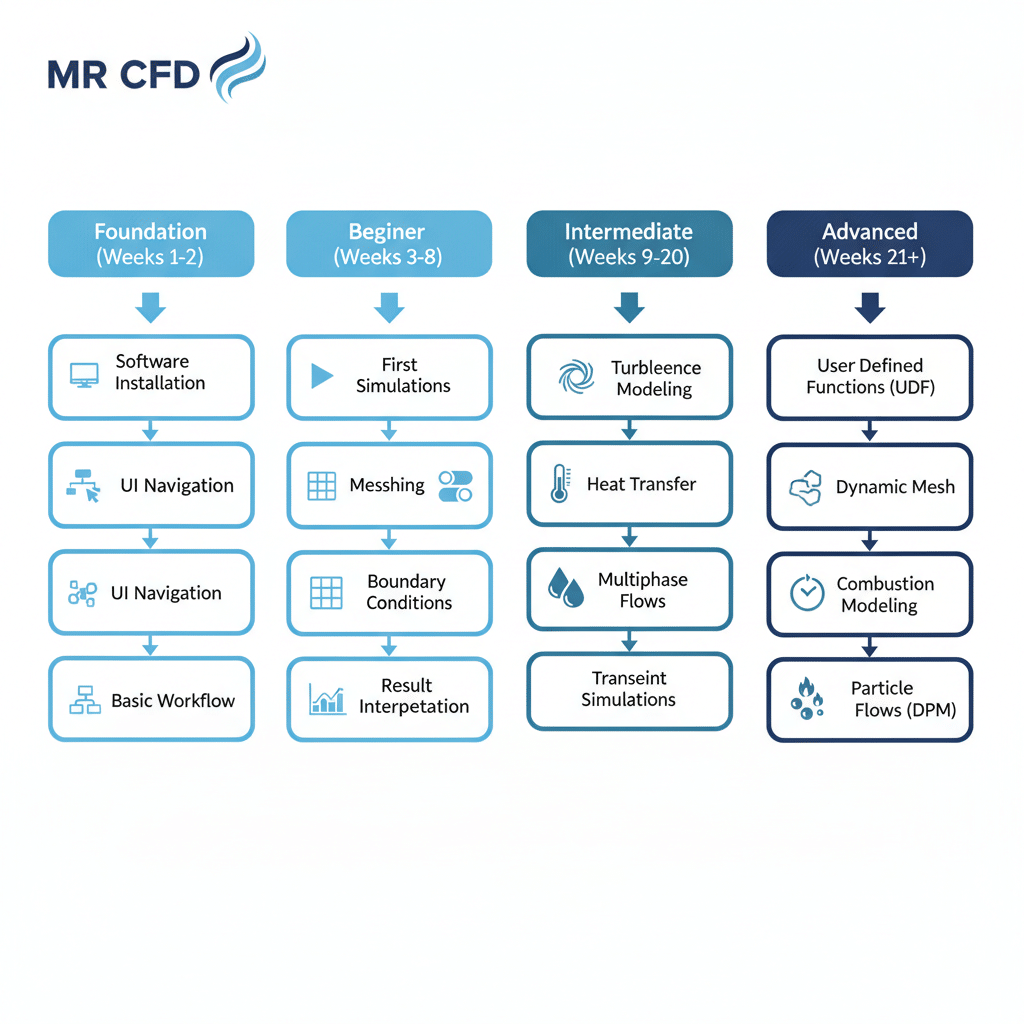
A structured approach is key to mastering a tool as comprehensive as Fluent. We’ve broken down the learning journey into four distinct stages, taking you from a complete novice to an advanced practitioner capable of tackling complex, real-world engineering challenges.
- Stage 1: Foundation (Weeks 1-2): Getting comfortable with the environment.
- Stage 2: Beginner (Weeks 3-8): Running your first end-to-end simulations.
- Stage 3: Intermediate (Weeks 9-20): Tackling real-world physics and complexity.
- Stage 4: Advanced (Weeks 21+): Specializing and mastering advanced techniques.
What Does the Foundation Stage Cover? (Weeks 1-2)
This stage is all about orientation. The goal is to demystify the software and understand the fundamental Ansys Fluent workflow basics: Geometry → Mesh → Setup → Solve → Post-Process.
You’ll learn where everything is and how the different components of the Ansys ecosystem work together.
How Do You Install and Set Up Ansys Fluent?
Your first step is getting the software running. Ansys offers free student versions which are perfect for learning. The installation process is straightforward:
- Download the Ansys Student package from their official website.
- Run the installer and follow the on-screen prompts. Ensure you select the Fluent component.
- The installer will handle licensing automatically for the student version.
- Launch the Ansys Workbench environment, which acts as the central hub for your projects.
Common issues often relate to administrative permissions or firewall settings, so ensure you have the necessary rights on your machine.
What Are the Key Components of the Fluent User Interface?
Opening Fluent for the first time can be intimidating. Let’s break down the main areas:
- Ribbon Menu (Top): Contains tabs for Setup, Solution, and Results, organizing tasks logically.
- Outline View (Left): A tree structure that guides you through the simulation setup process sequentially (e.g., Models, Materials, Boundary Conditions).
- Graphics Window (Center): The main viewport where you see your mesh, contours, vectors, and other visual results.
- Console (Bottom): Displays important information, error messages, and solver progress. This is your primary feedback channel.
Spend your first week simply exploring these areas. You can start with our ANSYS Fluent beginner tutorials for a guided tour.
What Should You Learn in the Beginner Stage? (Weeks 3-8)
Now, it’s time to get your hands dirty with your first simulations. We’ll start with simple, well-understood problems to build confidence and reinforce the workflow. The focus here is on mastering the fundamentals of meshing, boundary conditions, and result interpretation. This stage is covered comprehensively in our CFD Ansys Fluent Beginner Course.
How Do You Create Your First CFD Simulation in Fluent?
A classic “Hello, World!” project in CFD is simulating 2D laminar flow in a pipe.
- Geometry: Create a simple 2D rectangle in Ansys SpaceClaim or Design Modeler.
- Meshing: Use Ansys Meshing to create a structured grid of quadrilateral cells.
- Setup: In Fluent, define the fluid as water, set the flow as laminar, and apply boundary conditions: a uniform velocity at the inlet, zero pressure at the outlet, and a no-slip condition at the walls.
- Solve: Initialize the solution and run the calculation until the residuals converge.
- Post-Process: Visualize the results. You should see a parabolic velocity profile develop along the pipe, a hallmark of laminar flow. The beauty of this problem is that it has an analytical solution (Hagen–Poiseuille flow), allowing you to validate your simulation results—a critical skill.
What Meshing Strategies Should Beginners Master First?
The mesh is the single most important factor determining the accuracy of your simulation. A poor mesh will always yield poor results. Beginners should first understand:
- Structured vs. Unstructured Meshes: Structured meshes (uniform grid) are efficient and accurate but only work for simple geometries. Unstructured meshes (triangles/tetrahedrons) are highly flexible for complex shapes.
- Mesh Quality Metrics: Learn to check for metrics like Skewness and Orthogonal Quality. High skewness is a major cause of convergence failure.
- Inflation Layers: Adding thin layers of cells near walls is crucial for capturing boundary layer physics accurately.
Our ANSYS Fluent Meshing Training Course provides an in-depth exploration of these essential meshing techniques.
Which Boundary Conditions Are Essential for Beginners to Understand?
Boundary Conditions (BCs) are how you tell Fluent about the physics at the edges of your domain. Using the wrong one is a common beginner mistake.
- Velocity Inlet: Specifies a fixed fluid velocity entering the domain.
- Pressure Outlet: Specifies a fixed gauge pressure at an outlet. Use this when you don’t know the exit velocity.
- Wall: Represents a solid, impermeable boundary. The no-slip condition (fluid velocity is zero at the wall) is the default and most common setting.
- Symmetry: Used to reduce computational effort by modeling only a fraction of a symmetrical geometry.
- Periodic: Used for repeating geometries, like flow over a series of heat sink fins.
How Do You Interpret and Validate Your Simulation Results?
Getting a colorful plot isn’t the end goal. You need to know if the results are trustworthy.
- Residual Monitoring: Residuals are a measure of error in the solution. You must ensure they drop several orders of magnitude and plateau, indicating convergence.
- Convergence Criteria: Don’t just rely on residuals. Monitor key physical quantities (like drag on an object) to ensure they reach a steady value.
- Post-Processing: Learn to create meaningful visualizations like contour plots (for pressure, temperature), vector plots (for flow direction), and streamlines.
- Basic Validation: Compare your results against known data. For the pipe flow example, you can check if the calculated pressure drop matches the analytical formula. This is the essence of building confidence in your engineering benchmark results.
What Topics Define the Intermediate Stage? (Weeks 9-20)
With the fundamentals in place, you’re ready to tackle more complex physics that represent real-world engineering problems. This stage involves moving beyond simple laminar flows into turbulence, heat transfer, and multiphase systems. Our Ansys Fluent Intermediate Course is structured to guide you through this critical transition.
Which Turbulence Models Should You Learn and When to Use Them?
Most industrial flows are turbulent. Choosing the right turbulence model is a trade-off between accuracy and computational cost. Here’s a quick guide:
- k-epsilon () Models: The industry workhorse for decades. Robust and computationally cheap, but less accurate for flows with strong separation or swirl. Good for initial analyses.
- k-omega () SST Model: Often the best choice for general-purpose simulations. It combines the strengths of the k-epsilon and k-omega models, providing excellent performance for boundary layers and external aerodynamics. This is a go-to model for many applications.
- Large Eddy Simulation (LES): A much higher-fidelity (and more expensive) approach that directly resolves the large-scale turbulent eddies. Reserved for applications where extreme accuracy is needed, like acoustics or combustion instability.
How Do You Set Up Heat Transfer Simulations in Fluent?
Many CFD problems involve temperature changes. Key concepts to master include:
- Conjugate Heat Transfer (CHT): Simulating heat transfer between both fluid and solid domains simultaneously (e.g., cooling an electronic chip with a heat sink).
- Radiation Models: Essential when heat transfer through electromagnetic waves is significant (e.g., furnaces, solar applications). The Discrete Ordinates (DO) model is a powerful and versatile option.
- Thermal Boundary Conditions: Applying conditions like fixed temperature, heat flux, or convection at the boundaries.
Dive deep into these topics with our Heat Transfer All Levels Course.
What Are the Fundamentals of Multiphase Flow Modeling?
Multiphase flows involve two or more distinct phases (e.g., liquid-gas, solid-liquid). They are common in process industries, energy, and biomedical applications.
- Volume of Fluid (VOF) Model: Ideal for tracking the interface between immiscible fluids, like sloshing in a tank or free-surface flows (e.g., waves).
- Eulerian Model: Treats each phase as an interpenetrating continuum. Good for modeling fluidized beds or bubble columns where phases mix thoroughly.
- Mixture Model: A simplified Eulerian model for cases where phases move at different velocities but are in local equilibrium.
Our CFD Multi-Phase Flow Courses provide comprehensive training on these complex but powerful models.
How Do You Approach Transient (Time-Dependent) Simulations?
Not all problems reach a steady state. Phenomena like vortex shedding behind a cylinder, filling a tank, or engine cycles require a transient (time-dependent) analysis.
- Time-Step Selection: Choosing an appropriate time step () is crucial. It must be small enough to capture the physics of interest. The Courant Number is a key guide for determining stability.
- Temporal Discretization: You’ll need to choose how the equations are integrated over time, with options like first-order or second-order implicit schemes.
- Data Analysis: Analyzing transient results involves creating animations, time-averaged statistics, and frequency analyses (FFT) to understand unsteady behavior.
What Advanced Topics Should You Master in ANSYS Fluent (ANSYS Fluent Advanced Course)? (Weeks 21+)
This is where you transition from a competent user to a true CFD expert. These topics involve deep customization, complex moving geometries, and reacting flows. They are often required for specialized R&D roles and are covered in detail in our Ansys Fluent Advanced Course and dedicated specialized courses.
When and Why Should You Learn User Defined Functions (UDFs)?
Learn UDFs when the built-in models in Fluent are not sufficient for your problem. UDFs give you ultimate control by allowing you to:
- Define a custom velocity profile at an inlet.
- Implement a non-standard material property that depends on temperature and pressure.
- Add custom source terms to model things like chemical reactions or heat generation. A basic understanding of C programming is required. Our CFD UDF All Levels Course will teach you everything you need to know.
How Do You Simulate Moving and Deforming Geometries?
Many real-world problems involve moving parts. Fluent offers several dynamic mesh techniques:
- Sliding Mesh: For components that rotate or translate relative to each other, like a pump impeller inside a casing.
- Overset Mesh (or Overlapping Mesh): A powerful technique where separate meshes for different moving bodies overlap. Ideal for complex motions like store separation from an aircraft.
- Morphing/Deforming Mesh: For cases where the boundary itself deforms, such as a diaphragm pump or an FSI (Fluid-Structure Interaction) problem. Explore these techniques in our CFD Dynamic Mesh and RBF Courses.
What Are the Key Concepts in Combustion Modeling?
Simulating combustion is one of the most challenging areas of CFD, involving the interplay of fluid flow, turbulence, heat transfer, and chemistry.
- Species Transport: You must solve transport equations for each chemical species involved in the reaction.
- Reaction Mechanisms: These define the chemical pathways and reaction rates. They can range from simple one-step models to complex, multi-species mechanisms.
- Turbulence-Chemistry Interaction: Turbulence dramatically affects reaction rates. Models like Eddy Dissipation Concept (EDC) are needed to capture this. Our Combustion All Levels Course is designed for engineers working in engine design, furnaces, and fire safety.
How Do You Model Particle Flows Using DPM?
The Discrete Phase Model (DPM) is used to track individual particles, droplets, or bubbles within a continuous fluid phase.
- Particle Injection: You define where particles enter the domain, their size distribution, and initial velocity.
- Particle-Fluid Interaction: You can model the two-way coupling of momentum and energy between the particles and the fluid.
- Applications: Common uses include spray drying, fuel injection, and erosion analysis. Master this technique with the DPM All Levels Course.
How Should You Structure Your Daily Learning Schedule?
Consistency is more important than intensity. Cramming CFD concepts rarely works. Instead, build a sustainable habit that fits your life, whether you’re a full-time student or a working professional.
What Is the Optimal Weekly Time Commitment for Learning Fluent?
We recommend a commitment of 10-15 hours per week for steady, meaningful progress. This allows you to absorb new concepts without feeling overwhelmed. A typical week could be structured as:
- Theory & Concepts (3-4 hours): Watching video lectures, reading documentation, and understanding the physics.
- Hands-On Tutorials (5-7 hours): Replicating guided tutorials step-by-step. This is where you build muscle memory.
- Independent Practice & Projects (2-4 hours): Modifying tutorials or starting small projects from scratch. This is where true learning happens.
How Do You Balance Theory and Hands-On Practice?
A great rule of thumb is the 30/70 ratio: 30% theory, 70% hands-on practice. It’s easy to get trapped in “tutorial purgatory,” where you only replicate what others have done. To break out of this:
- Complete a tutorial exactly as instructed.
- Then, change one parameter (e.g., inlet velocity, fluid viscosity) and predict what will happen.
- Run the simulation again and analyze the differences. This cause-and-effect process solidifies your understanding far better than passive learning ever could.
What Free Resources Does MR CFD Offer to Beginners?
Before you invest in a paid course, we believe in providing value upfront. We offer a wealth of high-quality free content to help you start your Ansys Fluent learning path on the right foot.
Where Can You Find Free Ansys Fluent Tutorials?
Our CFD free tutorial library is the perfect starting point. We have step-by-step guides and video walkthroughs on a variety of beginner-friendly topics. Additionally, our MR CFD YouTube channel and blog are constantly updated with new content, tips, and tricks from our expert engineers.
What Sample Projects Should Beginners Start With?
Here are 5 ideal first projects that teach fundamental concepts:
- 2D Laminar Pipe Flow: Teaches the entire workflow, meshing, and basic validation.
- Flow Over a 2D Cylinder: Introduces turbulence modeling and the concept of vortex shedding (a transient phenomenon).
- Natural Convection in a Cavity: A classic heat transfer problem that teaches buoyancy-driven flow.
- 2D Airfoil Aerodynamics: Introduces lift and drag calculation and the importance of mesh refinement near the body.
- Simple Mixing Tee: A basic example of species transport or heat mixing.
Which MR CFD Paid Courses Should You Consider?
While free resources are great for starting, a structured, comprehensive course is the fastest way to become job-ready. Our courses provide an Ansys Fluent certification roadmap, complete with portfolio-worthy projects, expert support, and a deep dive into industry best practices.
What Does the MR CFD Ansys Fluent Beginner Course Include?
This course is designed to take you from zero to confidently running your own basic simulations. You will learn the complete workflow, fundamental meshing techniques, solver settings, and post-processing, all through hands-on industrial examples.
Learn more and enroll here: MR CFD Ansys Fluent Beginner Course
How Does the Intermediate Course Build on Beginner Knowledge?
The intermediate course assumes you’ve mastered the basics and moves on to the physics that dominate industrial applications: turbulence, heat transfer, and multiphase flows. You’ll learn to choose the right models and tackle more complex geometries.
Take the next step: MR CFD Ansys Fluent Intermediate Course
When Should You Enroll in the Advanced Course?
You’re ready for the advanced course when you’re comfortable with turbulence and heat transfer and need to learn techniques for customization and complex dynamic systems, such as UDFs, dynamic meshing, and reacting flows.
Become an expert: MR CFD Ansys Fluent Advanced Course
What Specialized Courses Does MR CFD Offer?
Once you have a solid foundation, you can specialize in an area that aligns with your career goals. We offer a suite of expert-led courses on high-demand topics.
How Can You Master Turbomachinery Simulations?
Learn to simulate pumps, turbines, compressors, and fans with our dedicated course covering rotating machinery specifics like moving reference frames and blade-to-blade analysis. Turbomachinery All Levels Course
What Will You Learn in the Combustion Modeling Course?
Dive into the complex world of reacting flows, learning to model flames, emissions, and chemical kinetics for applications in engines, gas turbines, and furnaces. Combustion All Levels Course
Why Should You Take the Multiphase Flow Course?
Master the VOF, Eulerian, and DPM models to simulate everything from sprays and bubble columns to sloshing tanks and oil-water separation. Multi-Phase Flow All Levels Course
How Does the UDF Course Unlock Advanced Customization?
Gain ultimate control over Fluent by learning to write your own C code to define custom physics and boundary conditions, setting you apart as a top-tier analyst. UDF All Levels Course
What Common Mistakes Do Beginners Make When Learning Fluent?
Over my 15 years of professional CFD consulting experience, I’ve seen beginners make the same handful of mistakes over and over. Avoiding these pitfalls will dramatically accelerate your learning.
Why Do Beginners Struggle with Mesh Quality?
The “garbage in, garbage out” principle is absolute in CFD. A poor-quality mesh is the #1 cause of problems.
- Consequences: High skewness or large jumps in cell size can cause the solver to diverge (fail) or, even worse, converge to a wrong answer.
- Solution: Always check your mesh quality metrics (Skewness < 0.85, Orthogonal Quality > 0.1). Use inflation layers at walls. Perform a mesh independence study to ensure your results don’t change with further refinement.
How Can You Avoid Incorrect Boundary Condition Setup?
Applying the wrong BC is like giving the solver incorrect instructions.
- Common Error: Setting a pressure outlet at a location where flow might re-enter the domain. This can cause a “reversed flow” error.
- Solution: Always place outlets far downstream where the flow is fully developed and uniform. Double-check the physical realism of every BC you apply. Does it match the real-world situation?
What Are the Signs of Non-Converged Solutions?
A solution that isn’t converged is physically meaningless.
- Signs:
- Residuals are not dropping or are oscillating wildly.
- Key physical quantities (like lift or mass flow rate) have not reached a steady plateau.
- The overall mass/energy balance of the system is poor.
- Solution: If you see these signs, stop the simulation. Re-check your mesh, boundary conditions, and solver settings. Don’t trust the pretty pictures until the numbers are stable.
How Do You Validate Your CFD Simulations?
Validation is the process of determining the degree to which a model is an accurate representation of the real world. Without it, CFD is just making colorful pictures. This commitment to experimental validation case studies is non-negotiable for professional work.
What Is the Difference Between Verification and Validation?
These terms are often confused, but the distinction is critical.
- Verification: “Are we solving the equations correctly?” This involves checking for bugs in the code and ensuring the solution is independent of the mesh resolution (mesh independence studies).
- Validation: “Are we solving the correct equations?” This involves comparing your simulation results against high-quality analytical, experimental, or benchmark data to assess the accuracy of your physical models (e.g., the turbulence model).
How Can You Compare Your Results Against Experimental Data?
Finding reliable data is key. Search academic journals, conference papers, and textbooks for experiments similar to your problem. When comparing, don’t just look at the plots. Quantify the error. A 5% difference in drag might be excellent agreement, while a 20% difference might indicate a flaw in your model setup.
Where Can You Find Benchmark Cases for Practice?
Practicing on well-documented cases is a fantastic way to build skills.
- NASA Turbulence Modeling Resource: A repository of validation cases for external aerodynamics.
- ERCOFTAC Classic Collection: A database of quality test cases for turbulence, combustion, and multiphase flows.
- MR CFD’s Validated Project Library: Our courses include projects that are validated against established engineering benchmark results, teaching you the validation process directly.
What Career Paths Can You Pursue After Mastering Ansys Fluent?
Mastering Ansys Fluent is a gateway to a rewarding and intellectually stimulating career. You become a key player in the product development cycle, influencing design decisions with data-driven insights long before physical prototypes are made.
How Do You Transition from Learning to Professional CFD Work?
- Build a Portfolio: Don’t just list courses on your resume. Create a portfolio of 3-5 high-quality simulation projects that showcase your skills. Document your process: the problem, your meshing strategy, model selection, validation, and conclusions.
- Get Certified: An Ansys Fluent certification roadmap, like the one provided by our MR CFD courses, demonstrates a structured and comprehensive understanding of the software to employers.
- Network: Join LinkedIn groups focused on CFD and Ansys. Attend webinars and virtual conferences. Connect with professionals in the industries you’re targeting.
- Tailor Your Applications: Highlight the specific CFD skills and projects relevant to the job description. Show that you understand their industry’s unique challenges.
What Industries Offer the Best Opportunities for CFD Engineers?
The demand for CFD expertise is booming, particularly in sectors focused on high-performance and sustainable technology.
- Electric Vehicles & Batteries: Thermal management is a critical challenge, creating huge demand for CFD specialists in battery cooling and e-motor performance.
- Renewable Energy: Optimizing wind turbines, designing hydrogen fuel cells, and improving solar panel efficiency are all CFD-heavy tasks.
- Aerospace (New Space & UAVs): The rapid growth of commercial space flight and autonomous drones has created a surge in demand for aerodynamics and propulsion system analysts. Many companies now offer remote or hybrid work options, making it possible to work on cutting-edge projects from anywhere in the world.
How Can MR CFD Support Your Learning Journey Beyond Courses?
Our goal is to be your long-term partner in professional development. We’ve built an ecosystem of resources to support you at every stage of your career.
What Consulting Services Does MR CFD Provide?
Stuck on a particularly challenging real-world project? Our CFD consulting services can help. We provide expert guidance, project assistance, and full simulation outsourcing, allowing you to leverage our 15+ years of experience to solve your toughest problems.
How Can You Access High-Performance Computing for Large Simulations?
Don’t let your local hardware limit your ambition. Our ANSYS HPC simulation platform provides affordable, on-demand access to powerful computing clusters, enabling you to run large, complex simulations that would be impossible on a desktop workstation.
Does MR CFD Offer Custom Training for Teams?
If your company is looking to upskill its engineering team, we offer tailored corporate training programs. We can create a custom curriculum based on your specific industry needs and deliver it either on-site or remotely.
What Are the Latest Ansys Fluent Features in 2026?
The world of CFD is constantly evolving, and Ansys Fluent is at the cutting edge. The 2026 release cycle continues to focus on workflow efficiency, advanced physics, and democratizing simulation.
How Has the Fluent User Interface Evolved?
The trend is toward a more streamlined and intuitive user experience. Expect to see more AI-driven features, such as automated meshing recipes for specific applications and guided workflows that help beginners make appropriate setup choices, significantly reducing the learning curve.
What New Physics Models Are Available in Fluent 2026?
Ansys continues to expand Fluent’s multiphysics capabilities to address emerging industries. Key new models include:
- Advanced Battery Modeling: Detailed electrochemical-thermal models for predicting battery performance, degradation, and thermal runaway. Check out our CFD Battery All Levels Course.
- Electrolysis & Fuel Cell Models: High-fidelity tools for designing the next generation of green hydrogen production and fuel cell technology. Our Electrolysis course and Fuel Cell courses cover these innovations.
- Advanced Acoustics Models: Sophisticated methods for predicting noise generated by fluid flow (aeroacoustics), crucial for automotive and aerospace applications. Learn more in our Acoustic All Levels Course.
How Do You Stay Updated with CFD Best Practices?
Learning doesn’t stop after you finish a course. CFD is a dynamic field, and continuous learning is essential for staying at the top of your game.
Which CFD Communities Should You Join?
- CFD Online: A classic forum for technical discussions and troubleshooting.
- LinkedIn Groups: Search for groups like “Ansys Fluent Users” or “Computational Fluid Dynamics” to network and share knowledge.
- Professional Societies: Organizations like AIAA (American Institute of Aeronautics and Astronautics) and ASME (American Society of Mechanical Engineers) have excellent resources and conferences.
What Publications Should CFD Engineers Follow?
- Journal of Computational Physics
- Computers & Fluids
- AIAA Journal
- The MR CFD Blog: We regularly post articles on new techniques, tutorials, and best practices in CFD simulation.
What Is Your Next Step to Start Learning Ansys Fluent Today?
You have the roadmap. Now it’s time to take the first step. The key is to start small, build momentum, and follow a structured path.
How Can You Access MR CFD’s Free Tutorials Right Now?
The best way to start is by getting a feel for the software with a guided project. Head over to our free tutorial library and begin with the “2D Laminar Pipe Flow” tutorial. It’s the perfect first step. ✅
Which MR CFD Course Should You Enroll In First?
If you are a complete beginner or have some fragmented knowledge, the MR CFD Ansys Fluent Beginner Course is your ideal starting point. It provides the solid, structured foundation you need for long-term success.
How Can You Connect with MR CFD’s Learning Community?
Join our social media channels and forums! Learning is easier when you’re part of a community. Share your progress, ask questions, and connect with fellow learners and expert mentors who are on the same journey.
Frequently Asked Questions About Learning Ansys Fluent
How long does it take to learn Ansys Fluent from scratch?
With consistent practice (10-15 hours/week), you can achieve beginner proficiency in 2-3 months, allowing you to solve basic problems. Reaching an intermediate level, where you can handle turbulence and heat transfer, typically takes 6-8 months. Advanced proficiency, including topics like UDFs and dynamic mesh, often takes 12+ months of dedicated learning and practice. Our structured CFD courses are designed to significantly accelerate this timeline.
Can I learn Ansys Fluent without a fluid mechanics background?
While it’s technically possible to learn the software’s interface, you won’t be able to make sound engineering judgments without understanding the fundamentals. We strongly recommend building a foundational knowledge of fluid mechanics first. A lack of theoretical understanding is a primary reason for incorrect simulation results.
Is Ansys Fluent difficult to learn for beginners?
Ansys Fluent has a steep learning curve due to its vast capabilities and the underlying physics. However, it is not “difficult” if you follow a structured learning path. A roadmap like this one, combined with high-quality tutorials, breaks the process into manageable steps. It’s more complex than learning CAD software but very achievable with the right approach.
Do I need to pay for Ansys Fluent software to learn it?
No. Ansys provides a comprehensive, free student version of their software suite, including Fluent. It has some limitations on mesh size but is more than powerful enough for learning all the concepts from beginner to advanced. Our CFD courses are designed to be completed using the student version.
What is the difference between Ansys Fluent and CFX?
Both are powerful CFD solvers owned by Ansys. Historically, Fluent was a finite-volume solver that excelled with unstructured meshes and a vast range of physical models. CFX is a finite-element based solver known for its robustness and excellence in turbomachinery applications. Today, their capabilities overlap significantly, but some industries still prefer one over the other. We also offer an Ansys CFX All Levels Course for those interested.
Can I get a job after completing MR CFD’s Ansys Fluent courses?
Yes. Our courses are designed specifically to build job-ready skills. By completing our courses, you will have a portfolio of industry-relevant projects and an official certification that demonstrates your competence to employers. Many of our students have successfully transitioned into CFD roles after completing their training with us.
How much does it cost to learn Ansys Fluent through MR CFD?
We offer a range of options, from free tutorials to comprehensive paid courses. Our paid courses provide tremendous value, including dozens of hours of video content, downloadable project files, direct support from experts, and a certificate of completion. Please visit our course portal for the most up-to-date pricing. We believe in transparency and offer free introductory content so you can experience the quality before you buy.
What computer do I need to run Ansys Fluent simulations?
For learning, a modern laptop with at least a 4-core CPU, 16 GB of RAM, and an SSD is sufficient. For professional work involving large meshes, we recommend a workstation with 16+ cores and 128 GB+ of RAM. As an alternative for large jobs, our CFD HPC services offer affordable access to high-performance computing power.
Are MR CFD courses self-paced or scheduled?
All of our online courses are 100% self-paced. Once you enroll, you get lifetime access to the course materials, so you can learn on your own schedule and revisit concepts whenever you need to. Our support team is always available to answer questions as you progress.
How do MR CFD courses compare to university CFD classes?
University courses are often heavy on theory, focusing on the derivation of equations and numerical methods. Our MR CFD Fluent courses are highly practical and industry-focused. While we cover the necessary theory, our primary goal is to teach you how to apply that theory to solve real-world engineering problems using Ansys Fluent, following the best practices in CFD simulation that are used in industry today.
Related Posts
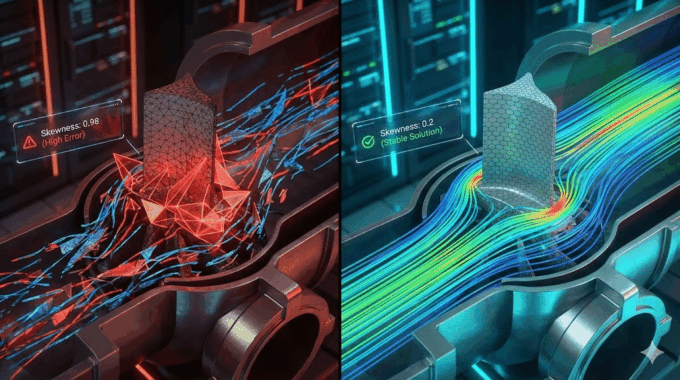
Errors Occurring in Simulations with ANSYS Fluent: A Technical Guide to Convergence & Stability
ANSYS Fluent simulates engineering problems based on the Finite Volume Method (FVM). Consequently, the errors…
How Ansys HPC Servers Accelerate Your Fluent Dynamic Simulations
We have all been there. You hit “Calculate” on a transient simulation, and the estimated…

Ansys HPC Case Study: Accelerating a 120-Million Cell Simulation Using MR CFD’s Ansys HPC Service
In the high-stakes world of aerodynamics, fidelity is everything. But as engineers, we often hit…
 Talk On WhatsApp
 Talk On WeChat

Comments (0)