

Ansys Fluent HPC Scaling Study: Finding the Sweet Spot Between Speed and Cost
In the world of computational fluid dynamics, time is the most expensive variable. Every hour an engineer spends waiting for a simulation to converge is an hour not spent analyzing design iterations or optimizing product performance. Naturally, the instinct is to throw more hardware at the problem. If 32 cores take 10 hours, 64 cores should take 5, right?
Unfortunately, scaling ansys fluent hpc performance is rarely that linear.
As a Senior HPC Architect who has deployed clusters ranging from small departmental servers to massive Tier-1 supercomputers, I see the same mistake repeated constantly: organizations over-invest in CPU cores without understanding the underlying physics of parallel computing or the economics of Ansys HPC Pack licensing cost. The result is a “diminishing returns” trap where you pay exponentially more for marginal gains in speed.
This guide is not just about benchmarks; it is a strategic analysis of how to optimize your CFD simulation speed-up. We will explore the technical bottlenecks—from MPI (Message Passing Interface) latency to memory bandwidth—and define the “sweet spot” where hardware performance aligns perfectly with your budget.
Why Doesn’t Doubling the Cores Double the Simulation Speed?
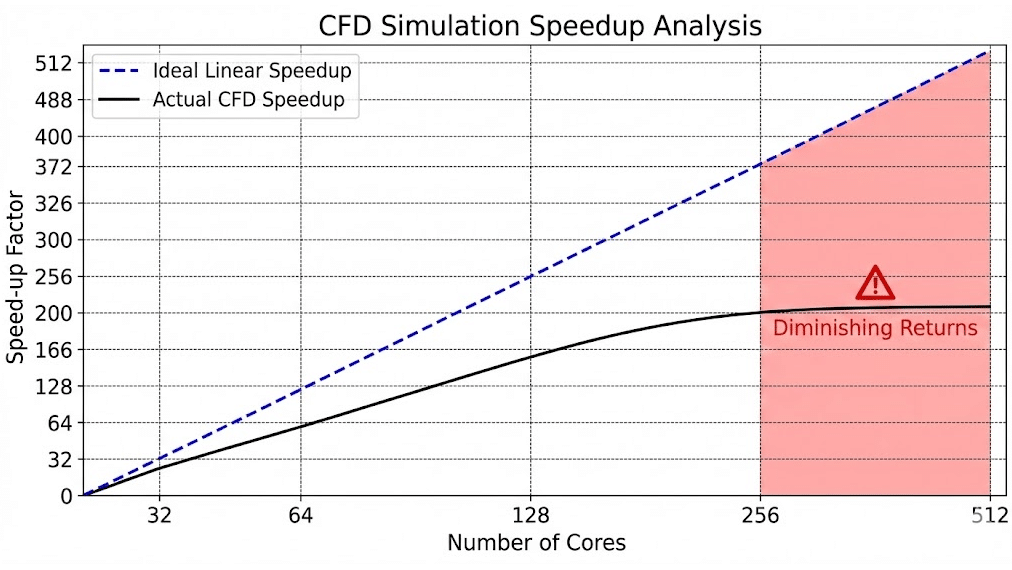
The dream of “linear scaling”—where doubling the number of processors cuts the solution time exactly in half—is the holy grail of high-performance computing. However, in reality, we are bound by Amdahl’s Law analysis.
Amdahl’s Law states that the theoretical speed-up of a program using multiple processors is limited by the sequential fraction of the program. In ansys fluent hpc, while the finite volume solver is highly parallelizable, there are distinct serial processes (like file I/O, mesh partitioning, and global reductions) that cannot be split.
Furthermore, as you add more cores, you introduce a new overhead: communication. Imagine a room full of mathematicians solving a massive equation. If there are two mathematicians, they can split the work easily. If there are 200, they spend more time shouting numbers at each other than actually calculating. This is Parallel processing efficiency.
In CFD terms, as we decompose the domain into smaller and smaller chunks, the ratio of “computation” (solving cells) to “communication” (exchanging boundary data with neighbors) shifts unfavorably. Eventually, the interconnect becomes saturated, and adding more cores can actually slow down the simulation.
Key Takeaway: Efficiency is never 100%. A well-tuned cluster might achieve 80-90% efficiency at low core counts, but this drops as scale increases. The goal is to stop scaling before efficiency plummets.
What Are the Key Bottlenecks in Ansys Fluent HPC Scaling?
When a simulation fails to scale, it is rarely a software bug; it is almost always a hardware bottleneck. Understanding the hardware architecture is critical for HPC cluster for Ansys design. The two primary choke points are Memory Bandwidth and Interconnect Latency.
Memory Bandwidth Saturation
Modern CPUs have high core counts (e.g., 64 cores per socket), but they share a fixed number of memory channels. Ansys Fluent is a memory-bandwidth-bound application. It requires massive amounts of data to be shuttled back and forth from RAM to the CPU registers.
If you fully populate a 64-core chip with a CFD job, the cores may starve because the RAM simply cannot feed data fast enough. This is why “performance-per-core” often drops on high-density chips unless you specifically select SKUs with high memory bandwidth per core.
How Critical is the Interconnect (Infiniband vs. Ethernet)?
Once your simulation exceeds a single compute node (e.g., going from 64 cores to 128 cores across two machines), the data must travel over cables. This is where the battle of Infiniband vs. Ethernet latency is won or lost.
Standard 10Gb Ethernet (common in offices) has high latency (microseconds matter here). For an implicit solver like Fluent, which requires tight coupling and frequent synchronization between partitions, high latency is fatal. The CPU cores sit idle, waiting for data packets to arrive from the other node.
For scaling beyond a single node, a low-latency fabric like InfiniBand (HDR/NDR) or Omni-Path is non-negotiable. In our CFD Managed HPC Services, we utilize InfiniBand fabrics to ensure that multi-node scaling remains linear as long as possible. If you are running on standard Ethernet, you are likely wasting up to 40% of your compute power on communication delays.
Does Mesh Size Dictate the Optimal Core Count?
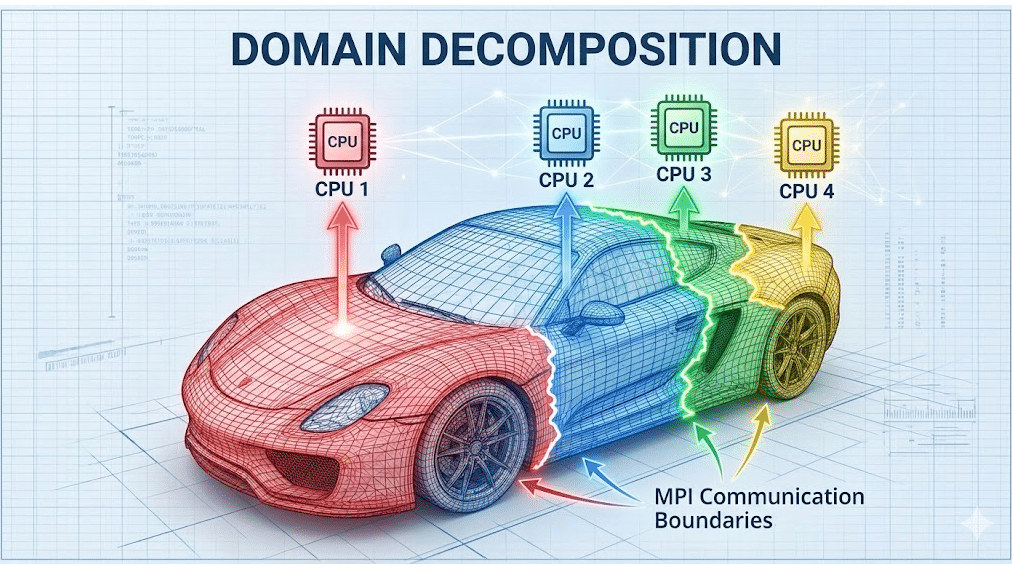
Yes, and this is the most practical rule of thumb for any CFD engineer. The optimal core count is directly a function of your mesh size.
The industry “Gold Standard” for Ansys Fluent is to maintain between 50,000 to 100,000 cells per core.
- > 100k cells/core: High computation efficiency, but slow turnaround time.
- 50k-100k cells/core: The Sweet Spot. Good balance of computation and communication.
- < 50k cells/core: Communication dominance. Parallel processing efficiency drops rapidly.
Why? Because of Domain decomposition methods. Ansys Fluent uses algorithms (like the METIS partitioning algorithm) to chop the mesh into parts. If the parts get too small, the “surface area” (shared boundaries with other cores) becomes too large relative to the “volume” (internal cells). The core spends all its cycles managing the boundaries and none solving the physics.
How Do Ansys Licensing Costs Impact the Scaling Decision?
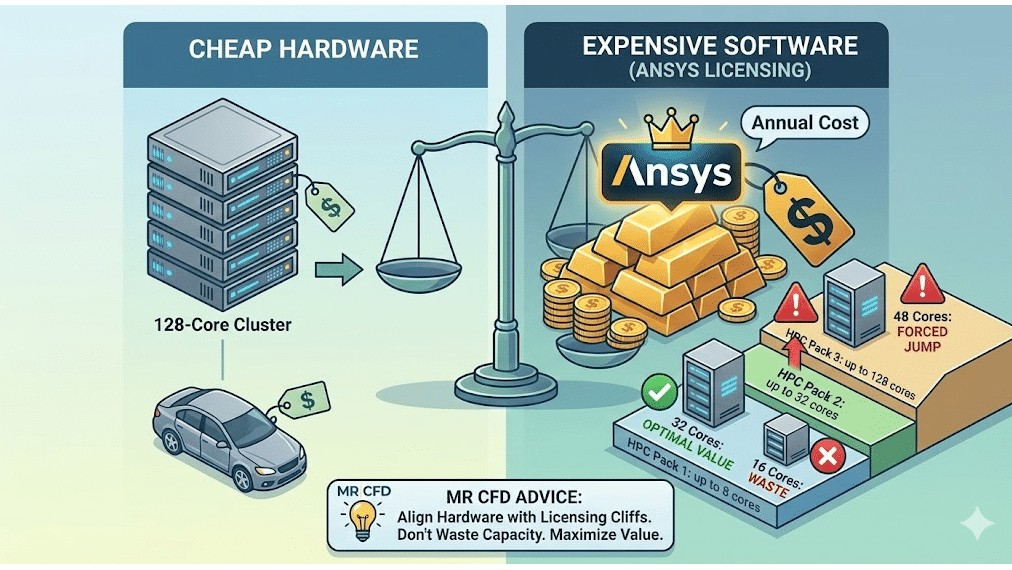
Here is the brutal economic reality: Hardware is cheap; software is expensive.
You can buy a 128-core cluster for the price of a mid-range car. However, licensing those 128 cores for Ansys Fluent can cost significantly more annually. Therefore, the goal of core count optimization is not just about speed—it is about maximizing the value of your license.
Ansys uses a tiered licensing system (HPC Packs):
- HPC Pack 1: Enables up to 8 parallel cores.
- HPC Pack 2: Enables up to 32 parallel cores.
- HPC Pack 3: Enables up to 128 parallel cores.
The Economic Sweet Spot Strategy: If you have an HPC Pack 2 (32 cores), running on 16 cores is a waste of money—you are paying for capacity you aren’t using. Conversely, if you want to run on 48 cores, you are forced to jump to HPC Pack 3 (128 cores).
At MR CFD, we advise clients to align their hardware procurement strictly with these licensing cliffs. It makes no financial sense to build a 60-core cluster if it forces you into a license bracket designed for 128. You are better off optimizing your mesh and physics settings to run efficiently on 32 cores, or committing fully to 128 to get your money’s worth.
Benchmark Results: What Is the Ideal Setup for Large-Scale CFD?
To demonstrate these principles, we conducted a Strong vs. Weak scaling benchmark using a standard External Aerodynamics model (approx. 50 Million cells, Poly-Hexcore mesh) running typical turbulence models (k-omega SST).
Hardware Environment:
- CPU: AMD EPYC Milan series (High frequency)
- Interconnect: InfiniBand HDR
- Solver: Ansys Fluent, Double Precision, Coupled Solver
The Results:
| Core Count | Speed-Up Factor (Ideal) | Speed-Up Factor (Actual) | Parallel Efficiency | Notes |
| 32 Cores | 1.0x (Baseline) | 1.0x | 100% | 1.56M cells/core. Very efficient. |
| 64 Cores | 2.0x | 1.95x | 97.5% | Near linear. Excellent ROI. |
| 128 Cores | 4.0x | 3.60x | 90% | Good scaling. 390k cells/core. |
| 256 Cores | 8.0x | 6.10x | 76% | Efficiency drops. 195k cells/core. |
| 512 Cores | 16.0x | 9.20x | 57.5% | Overscaling. <100k cells/cores |
Analysis: Notice that at 512 cores, we are dropping below the 100k cells/core threshold. The efficiency plummets to 57%. You are throwing hardware at the problem, but getting very little speed in return.
For this specific 50M cell model, the sweet spot is 128 cores. Scaling beyond this yields faster results, but at a drastically higher cost per simulation hour.
Why Choose MR CFD’s Managed HPC Services Over Building Your Own Cluster?
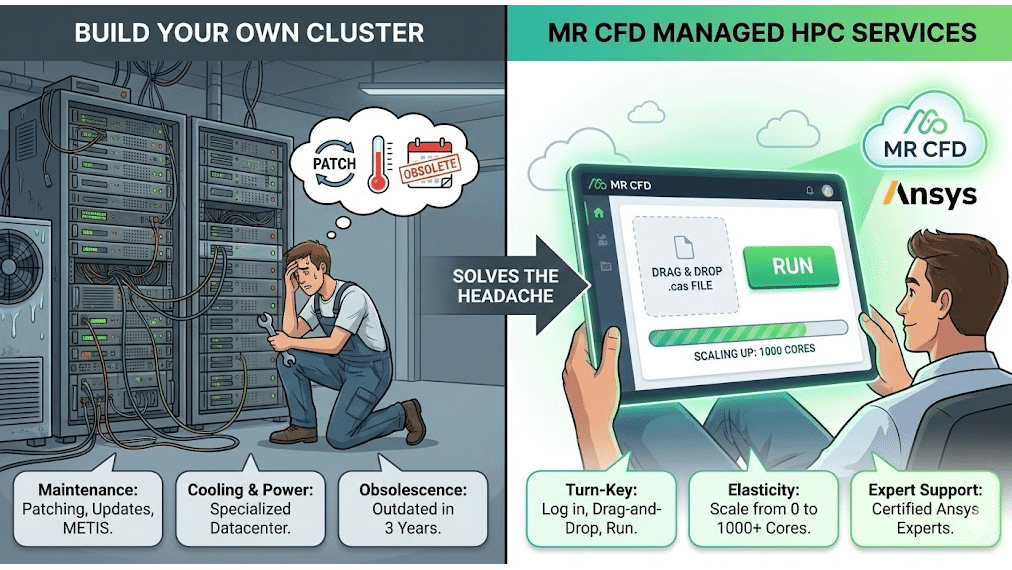
Many engineering firms wrestle with the “Build vs. Buy” decision. Building an on-premise cluster gives you control, but it introduces massive overhead:
- Maintenance: Who patches the OS and updates the METIS partitioning algorithm libraries?
- Cooling & Power: High-density racks require specialized datacenter cooling.
- Obscelescence: That expensive hardware will be outdated in 3 years.
MR CFD Managed HPC Services solves this by providing Cloud HPC for engineering that is pre-tuned for Ansys. We handle the HPC hardware architecture, the scheduler (Slurm/PBS), and the MPI tuning.
- Turn-Key: You log in, drag-and-drop your .cas file, and hit run.
- Elasticity: Need 1,000 cores for a week? We scale up. Need zero cores next week? You pay nothing.
- Expert Support: Our team includes certified Ansys experts who can debug your UDFs or suggest better solver settings if performance lags.
We essentially democratize supercomputing, allowing startups and mid-sized firms to compete with industry giants without the capital expenditure.
Ready to Accelerate Your R&D Without Breaking the Bank?
Scaling ansys fluent hpc is a balancing act between physics, hardware, and budget. By understanding memory bandwidth bottlenecks and adhering to the “cells-per-core” rule, you can dramatically reduce your simulation time while maximizing the ROI of your Ansys licenses.
Don’t let inefficient scaling drain your R&D budget.
- Audit Your Performance: Are you getting the speed you paid for?
- Scale Smarter: Leverage our managed infrastructure to run larger models faster.
👉 Book a discovery call with MR CFD today. Let’s architect a solution that fits your physics and your wallet.
Frequently Asked Questions
What is the recommended number of cells per core for Ansys Fluent?
A general industry rule of thumb is to maintain between 50,000 to 100,000 cells per core. Dropping below this leads to communication dominance, where the CPU spends more time “talking” to other cores (exchanging boundary data) than actually solving the transport equations. For highly coupled physics (like combustion or VOF), sticking closer to 100k is safer.
Does Ansys Fluent run faster on GPUs or CPUs?
This is changing rapidly. While Ansys Fluent now supports native multi-GPU solvers which can offer massive speedups (sometimes 5-10x) for specific physics, traditional CPU clusters remain the standard for complex, legacy workflows. If your simulation involves complex User Defined Functions (UDFs), specific multiphase models, or dynamic meshing that isn’t yet GPU-ported, CPU clusters are still required. MR CFD offers both GPU and CPU architectures to match your specific solver needs.
What is the difference between Ansys HPC and Ansys HPC Pack licenses?
Ansys HPC licenses add cores linearly (1 license = 1 core), which is good for small increments. Ansys HPC Packs add cores exponentially (1 Pack = 8 cores, 2 Packs = 32 cores, 3 Packs = 128 cores, etc.). This makes Packs significantly more cost-effective for large-scale parallel processing. Choosing the right mix is crucial for Ansys HPC Pack licensing cost optimization.
Why did my simulation slow down when I added more cores?
This usually happens due to “overscaling.” If the mesh partition on each core is too small (<50k cells), or if the network interconnect has high latency (like standard Gigabit Ethernet), the MPI latency exceeds the computation time. The cores spend most of their time waiting for data rather than calculating, resulting in negative scaling.
How does MR CFD optimize cloud HPC for Fluent users?
We provide pre-configured clusters with tuned MPI settings, high-speed InfiniBand interconnects, and optimized hardware specifically matched to Ansys solver requirements. We handle the complex IT layer—drivers, schedulers, and network topology—eliminating the IT setup time for engineers so they can focus solely on the physics.
Related Posts
Errors Occurring in Simulations with ANSYS Fluent: A Technical Guide to Convergence & Stability
ANSYS Fluent simulates engineering problems based on the Finite Volume Method (FVM). Consequently, the errors…
How Ansys HPC Servers Accelerate Your Fluent Dynamic Simulations
We have all been there. You hit “Calculate” on a transient simulation, and the estimated…

Ansys HPC Case Study: Accelerating a 120-Million Cell Simulation Using MR CFD’s Ansys HPC Service
In the high-stakes world of aerodynamics, fidelity is everything. But as engineers, we often hit…
 Talk On WhatsApp
 Talk On WeChat

Comments (0)