

CPU Role in CFD Simulations in HPC Servers
Computational Fluid Dynamics (CFD) simulations are essential for engineers and researchers analyzing complex fluid flow phenomena. At MR CFD, our expertise lies in delivering CFD simulations using ANSYS Fluent, a leading software in the field. To meet the computational demands of these simulations, we offer High-Performance Computing (HPC) solutions tailored for our clients. A critical component of any HPC system is the CPU, which significantly influences simulation speed and efficiency.
This post focuses on the role of the CPU in CFD simulations, detailing the impact of core count, thread count, clock speed, cache, generation, and brand. Choosing the right CPU is crucial, but it’s part of a larger picture involving the role of hardware components in CFD performance. We’ll explore budget considerations and the importance of benchmarks for selecting a CPU for ANSYS Fluent. To truly achieve faster simulation results in CFD and structural analysis, optimizing your entire setup, including RAM configurations and potentially leveraging GPUs in HPC for ANSYS Fluent acceleration, is essential. We’ll conclude by presenting our HPC solutions and how they can address your simulation requirements.
Accelerate Your ANSYS Results with Seamless HPC Power
Long simulation times shouldn’t be a barrier to your CFD and structural analysis advancements. Leverage the benefits of dedicated High-Performance Computing for ANSYS. Our ANSYS HPC service provides seamless, on-demand access to computing resources fully optimized for ANSYS software, perfect for tackling even the most demanding ANSYS Fluent problems.
Experience dramatically faster results – completing simulations in hours instead of days. This acceleration directly translates to faster design cycles, the capacity to explore larger and more complex models, and enhanced productivity, all without the burden of managing your own HPC infrastructure. Get the most out of your ANSYS investment with the right computing power.
Explore HPC for Faster ANSYS CFD Solves
The Role of CPU in CFD Simulations
The CPU is the heart of an HPC system, executing the complex calculations required for CFD simulations in ANSYS Fluent. Its performance directly affects how quickly simulations complete, making it a pivotal factor in optimizing your workflow. Let’s break down the key CPU specifications and their impact:
Number of Cores
Cores are independent processing units within a CPU. ANSYS Fluent leverages multiple cores through parallel processing, dividing simulation tasks across them. More cores typically mean faster simulations, especially for large models. For example, a 16-core CPU could process tasks much faster than a 4-core CPU, though efficiency depends on how well the simulation scales with parallelization.

Number of Threads 
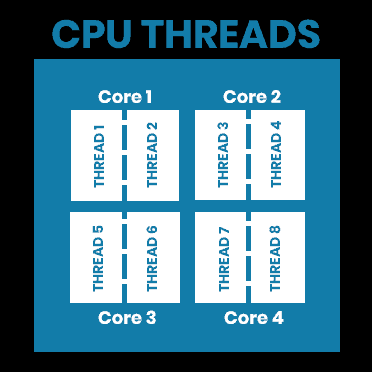
Threads allow each core to handle multiple tasks simultaneously via technologies like Intel’s hyper-threading or AMD’s simultaneous multithreading. A CPU with 8 cores and 16 threads can process 16 tasks at once, enhancing performance in multi-threaded applications like ANSYS Fluent. However, the benefit diminishes if threads compete for shared resources.
Clock Speed (Hertz)
Clock speed, measured in GHz, determines how many cycles a CPU completes per second. Higher clock speeds improve performance for single-threaded tasks or when the core count is limited. For instance, a 4.0 GHz CPU outperforms a 2.5 GHz CPU per core, which is crucial for non-parallelizable simulation steps.
Cache Size
Cache is fast memory within the CPU that stores frequently used data. Larger caches reduce delays in accessing data from RAM, speeding up iterative calculations in CFD. A CPU with 64 MB of cache, like the AMD Ryzen 9 7950X3D, can outperform one with 20 MB, such as the Intel Xeon E5-2650v2, in data-intensive simulations.
CPU Generation
Newer CPU generations feature architectural improvements, offering better performance and efficiency. For example, the Intel Xeon E5-2699v4 (2016) outperforms the E5-2697v2 (2013) due to advancements, even with similar core counts.
CPU Brand: Intel vs. AMD
Intel Xeon CPUs have long been favored for HPC due to their reliability and scalability. However, AMD Ryzen CPUs, like the Ryzen 9 7950X3D, are now competitive, offering high core counts and cost-effectiveness, making them ideal for modern CFD simulations.
Why CPU Selection Is Complex
While these specifications are critical, their combined effect complicates CPU selection. A high core count might be offset by low clock speed, or a large cache might not help if data exceeds its capacity. This interplay makes it hard to pick the best CPU based solely on specs. Instead, a practical approach is needed—one that balances performance with budget.
Using Benchmarks to Choose the Best CPU
CPU benchmarks simplify this decision by providing a single score reflecting overall performance. For ANSYS Fluent, multi-core benchmarks from [CPUBenchmark.net.net](https://www.cpubenchmark.net/) are especially relevant. The ratio between two CPUs’ benchmark scores directly indicates their relative simulation speed. For example, a CPU with a score of 20,000 will run simulations twice as fast as one with 10,000, assuming other components are equal.
CPU Comparison for MR CFD’s HPC Offerings
At MR CFD, we offer a range of CPUs for HPC systems, tailored to various budgets and simulation needs. Below is a comparison of their specifications and benchmark scores (as of May 5, 2025):
Examples of Performance Impact
– A simulation taking 10 hours on the E5-2650v2 (9,430) would take about 2.5 hours on the Ryzen 9 7950X3D (37,846), as the benchmark ratio (37,846 / 9,430 ≈ 4) suggests a 4x speed increase.
– Comparing the E5-2699v4 (22,816) to the E5-2697v2 (14,305), the ratio (1.6) indicates a 60% faster simulation time on the newer CPU.
These examples highlight how benchmarks guide CPU selection for ANSYS Fluent.
MR CFD’s HPC Services
At MR CFD, we go beyond providing CPUs. Our HPC solutions are designed to streamline your CFD simulations:
– Custom Configurations: Choose from budget-friendly options like the E5-2650v2 to top-tier CPUs like the Ryzen 9 7950X3D.
– Unlimited Software Installation: Install ANSYS Fluent or any other numerical software without restrictions.
– Comprehensive Support: We assist with software installation, file transfers, and using ANSYS Fluent effectively.
– Versatility: Our HPC systems support other numerical software, broadening their utility.
Visit our HPC Services to explore options and compare benchmarks.
Conclusion: Budget and Benchmarks Drive CPU Choice
Selecting the best CPU for CFD simulations in ANSYS Fluent isn’t just about specs—it’s about aligning performance with your budget. While core count, threads, clock speed, cache, generation, and brand matter, benchmarks offer a clear, practical way to compare CPUs. The benchmark ratio mirrors simulation speed, making it the go-to metric for decision-making.
At MR CFD, we’re here to help. Our HPC solutions, expert support, and flexible configurations ensure you get the most out of your simulations. Contact us or visit [our HPC page](https://portal.mr-cfd.com/hpc) to find the perfect CPU for your ANSYS Fluent projects.
Optimize your CFD simulations today with MR CFD’s HPC expertise!
Related Posts

Errors Occurring in Simulations with ANSYS Fluent: A Technical Guide to Convergence & Stability
ANSYS Fluent simulates engineering problems based on the Finite Volume Method (FVM). Consequently, the errors…

How Ansys HPC Servers Accelerate Your Fluent Dynamic Simulations
We have all been there. You hit “Calculate” on a transient simulation, and the estimated…

Ansys HPC Case Study: Accelerating a 120-Million Cell Simulation Using MR CFD’s Ansys HPC Service
In the high-stakes world of aerodynamics, fidelity is everything. But as engineers, we often hit…
 Talk On WhatsApp
 Talk On WeChat

Comments (0)